---
title: Announcing "entoas" - An Extension to Automatically Generate OpenAPI Specification Documents from Ent Schemas
author: MasseElch
authorURL: "https://github.com/masseelch"
authorImageURL: "https://avatars.githubusercontent.com/u/12862103?v=4"
image: https://entgo.io/images/assets/elkopa/entoas-code.png
---
The OpenAPI Specification (OAS, formerly known as Swagger Specification) is a technical specification defining a standard, language-agnostic
interface description for REST APIs. This allows both humans and automated tools to understand the described service
without the actual source code or additional documentation. Combined with the [Swagger Tooling](https://swagger.io/) you
can generate both server and client boilerplate code for more than 20 languages, just by passing in the OAS document.
In a [previous blogpost](https://entgo.io/blog/2021/09/10/openapi-generator), we presented to you a new
feature of the Ent extension [`elk`](https://github.com/masseelch/elk): a fully
compliant [OpenAPI Specification](https://swagger.io/resources/open-api/) document generator.
Today, we are very happy to announce, that the specification generator is now an official extension to the Ent project
and has been moved to the [`ent/contrib`](https://github.com/ent/contrib/tree/master/entoas) repository. In addition, we
have listened to the feedback of the community and have made some changes to the generator, that we hope you will like.
### Getting Started
To use the `entoas` extension use the `entc` (ent codegen) package as
described [here](https://entgo.io/docs/code-gen#use-entc-as-a-package). First install the extension to your Go module:
```shell
go get entgo.io/contrib/entoas
```
Now follow the next two steps to enable it and to configure Ent to work with the `entoas` extension:
1\. Create a new Go file named `ent/entc.go` and paste the following content:
```go
// +build ignore
package main
import (
"log"
"entgo.io/contrib/entoas"
"entgo.io/ent/entc"
"entgo.io/ent/entc/gen"
)
func main() {
ex, err := entoas.NewExtension()
if err != nil {
log.Fatalf("creating entoas extension: %v", err)
}
err = entc.Generate("./schema", &gen.Config{}, entc.Extensions(ex))
if err != nil {
log.Fatalf("running ent codegen: %v", err)
}
}
```
2\. Edit the `ent/generate.go` file to execute the `ent/entc.go` file:
```go
package ent
//go:generate go run -mod=mod entc.go
```
With these steps complete, all is set up for generating an OAS document from your schema! If you are new to Ent and want
to learn more about it, how to connect to different types of databases, run migrations or work with entities, then head
over to the [Setup Tutorial](https://entgo.io/docs/tutorial-setup/).
### Generate an OAS document
The first step on our way to the OAS document is to create an Ent schema graph. For the sake of brevity here is an
example schema to use:
```go title="ent/schema/schema.go"
package schema
import (
"entgo.io/ent"
"entgo.io/ent/schema/edge"
"entgo.io/ent/schema/field"
)
// Fridge holds the schema definition for the Fridge entity.
type Fridge struct {
ent.Schema
}
// Fields of the Fridge.
func (Fridge) Fields() []ent.Field {
return []ent.Field{
field.String("title"),
}
}
// Edges of the Fridge.
func (Fridge) Edges() []ent.Edge {
return []ent.Edge{
edge.To("compartments", Compartment.Type),
}
}
// Compartment holds the schema definition for the Compartment entity.
type Compartment struct {
ent.Schema
}
// Fields of the Compartment.
func (Compartment) Fields() []ent.Field {
return []ent.Field{
field.String("name"),
}
}
// Edges of the Compartment.
func (Compartment) Edges() []ent.Edge {
return []ent.Edge{
edge.From("fridge", Fridge.Type).
Ref("compartments").
Unique(),
edge.To("contents", Item.Type),
}
}
// Item holds the schema definition for the Item entity.
type Item struct {
ent.Schema
}
// Fields of the Item.
func (Item) Fields() []ent.Field {
return []ent.Field{
field.String("name"),
}
}
// Edges of the Item.
func (Item) Edges() []ent.Edge {
return []ent.Edge{
edge.From("compartment", Compartment.Type).
Ref("contents").
Unique(),
}
}
```
The code above is the Ent-way to describe a schema-graph. In this particular case we created three Entities: Fridge,
Compartment and Item. Additionally, we added some edges to the graph: A Fridge can have many Compartments and a
Compartment can contain many Items.
Now run the code generator:
```shell
go generate ./...
```
In addition to the files Ent normally generates, another file named `ent/openapi.json` has been created. Here is a sneak peek into the file:
```json title="ent/openapi.json"
{
"info": {
"title": "Ent Schema API",
"description": "This is an auto generated API description made out of an Ent schema definition",
"termsOfService": "",
"contact": {},
"license": {
"name": ""
},
"version": "0.0.0"
},
"paths": {
"/compartments": {
"get": {
[...]
```
If you feel like it, copy its contents and paste them into the [Swagger Editor](https://editor.swagger.io/). It should
look like this:
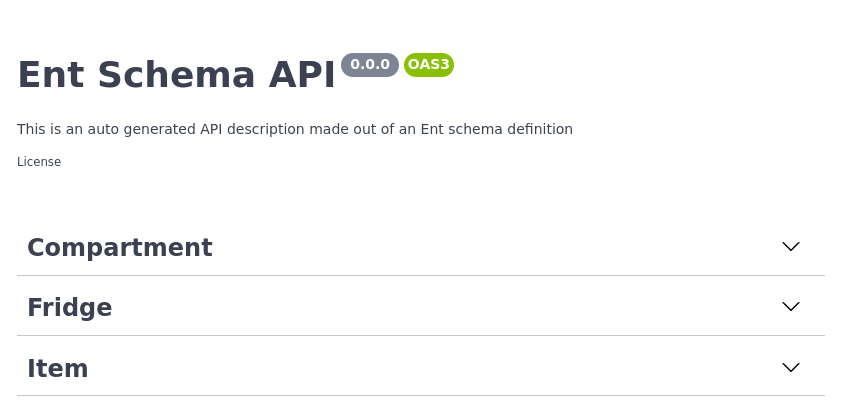
Swagger Editor
### Basic Configuration
The description of our API does not yet reflect what it does, but `entoas` lets you change that! Open up `ent/entc.go`
and pass in the updated title and description of our Fridge API:
```go {16-18} title="ent/entc.go"
//go:build ignore
// +build ignore
package main
import (
"log"
"entgo.io/contrib/entoas"
"entgo.io/ent/entc"
"entgo.io/ent/entc/gen"
)
func main() {
ex, err := entoas.NewExtension(
entoas.SpecTitle("Fridge CMS"),
entoas.SpecDescription("API to manage fridges and their cooled contents. **ICY!**"),
entoas.SpecVersion("0.0.1"),
)
if err != nil {
log.Fatalf("creating entoas extension: %v", err)
}
err = entc.Generate("./schema", &gen.Config{}, entc.Extensions(ex))
if err != nil {
log.Fatalf("running ent codegen: %v", err)
}
}
```
Rerunning the code generator will create an updated OAS document.
```json {3-4,10} title="ent/openapi.json"
{
"info": {
"title": "Fridge CMS",
"description": "API to manage fridges and their cooled contents. **ICY!**",
"termsOfService": "",
"contact": {},
"license": {
"name": ""
},
"version": "0.0.1"
},
"paths": {
"/compartments": {
"get": {
[...]
```
### Operation configuration
There are times when you do not want to generate endpoints for every operation for every node. Fortunately, `entoas`
lets us configure what endpoints to generate and which to ignore. `entoas`' default policy is to expose all routes. You
can either change this behaviour to not expose any route but those explicitly asked for, or you can just tell `entoas`
to exclude a specific operation by using an `entoas.Annotation`. Policies are used to enable / disable the generation
of sub-resource operations as well:
```go {5-10,14-20} title="ent/schema/fridge.go"
// Edges of the Fridge.
func (Fridge) Edges() []ent.Edge {
return []ent.Edge{
edge.To("compartments", Compartment.Type).
// Do not generate an endpoint for POST /fridges/{id}/compartments
Annotation(
entoas.CreateOperation(
entoas.OperationPolicy(entoas.PolicyExclude),
),
),
}
}
// Annotations of the Fridge.
func (Fridge) Annotations() []schema.Annotation {
return []schema.Annotation{
// Do not generate an endpoint for DELETE /fridges/{id}
entoas.DeleteOperation(entoas.OperationPolicy(entoas.PolicyExclude)),
}
}
```
And voilà! the operations are gone.
For more information about how `entoas`'s policies work and what you can do with
it, have a look at the [godoc](https://pkg.go.dev/entgo.io/contrib/entoas#Config).
### Simple Models
By default `entoas` generates one response-schema per endpoint. To learn about the naming strategy have a look at
the [godoc](https://pkg.go.dev/entgo.io/contrib/entoas#Config).
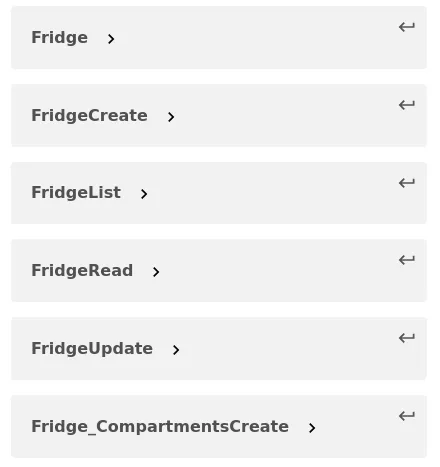
One Schema per Endpoint
Many users have requested to change this behaviour to simply map the Ent schema to the OAS document. Therefore, you now
can configure `entoas` to do that:
```go {5}
ex, err := entoas.NewExtension(
entoas.SpecTitle("Fridge CMS"),
entoas.SpecDescription("API to manage fridges and their cooled contents. **ICY!**"),
entoas.SpecVersion("0.0.1"),
entoas.SimpleModels(),
)
```
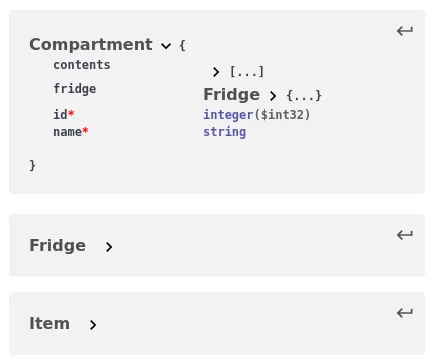
Simple Schemas
### Wrapping Up
In this post we announced `entoas`, the official integration of the former `elk` OpenAPI Specification generation into
Ent. This feature connects between Ent's code-generation capabilities and OpenAPI/Swagger's rich tooling ecosystem.
Have questions? Need help with getting started? Feel free to join our [Discord server](https://discord.gg/qZmPgTE6RX) or [Slack channel](https://entgo.io/docs/slack/).
:::note For more Ent news and updates:
- Subscribe to our [Newsletter](https://www.getrevue.co/profile/ent)
- Follow us on [Twitter](https://twitter.com/entgo_io)
- Join us on #ent on the [Gophers Slack](https://entgo.io/docs/slack)
- Join us on the [Ent Discord Server](https://discord.gg/qZmPgTE6RX)
:::