mirror of
https://github.com/ent/ent.git
synced 2026-05-22 09:31:45 +03:00

702 lines
18 KiB
Plaintext
702 lines
18 KiB
Plaintext
---
|
|
id: getting-started
|
|
title: Quick Introduction
|
|
sidebar_label: Quick Introduction
|
|
---
|
|
|
|
import Tabs from '@theme/Tabs';
|
|
import TabItem from '@theme/TabItem';
|
|
import AtlasMigrateDiff from './components/_atlas_migrate_diff.mdx';
|
|
import AtlasMigrateApply from './components/_atlas_migrate_apply.mdx';
|
|
import InstallationInstructions from './components/_installation_instructions.mdx';
|
|
|
|
**ent** is a simple, yet powerful entity framework for Go, that makes it easy to build
|
|
and maintain applications with large data-models and sticks with the following principles:
|
|
|
|
- Easily model database schema as a graph structure.
|
|
- Define schema as a programmatic Go code.
|
|
- Static typing based on code generation.
|
|
- Database queries and graph traversals are easy to write.
|
|
- Simple to extend and customize using Go templates.
|
|
|
|

|
|
|
|
## Setup A Go Environment
|
|
|
|
If your project directory is outside [GOPATH](https://github.com/golang/go/wiki/GOPATH) or you are not familiar with
|
|
GOPATH, setup a [Go module](https://github.com/golang/go/wiki/Modules#quick-start) project as follows:
|
|
|
|
```console
|
|
go mod init entdemo
|
|
```
|
|
|
|
## Create Your First Schema
|
|
|
|
Go to the root directory of your project, and run:
|
|
|
|
```console
|
|
go run -mod=mod entgo.io/ent/cmd/ent new User
|
|
```
|
|
|
|
The command above will generate the schema for `User` under `entdemo/ent/schema/` directory:
|
|
|
|
```go title="entdemo/ent/schema/user.go"
|
|
|
|
package schema
|
|
|
|
import "entgo.io/ent"
|
|
|
|
// User holds the schema definition for the User entity.
|
|
type User struct {
|
|
ent.Schema
|
|
}
|
|
|
|
// Fields of the User.
|
|
func (User) Fields() []ent.Field {
|
|
return nil
|
|
}
|
|
|
|
// Edges of the User.
|
|
func (User) Edges() []ent.Edge {
|
|
return nil
|
|
}
|
|
|
|
```
|
|
|
|
Add 2 fields to the `User` schema:
|
|
|
|
```go title="entdemo/ent/schema/user.go"
|
|
// Fields of the User.
|
|
func (User) Fields() []ent.Field {
|
|
return []ent.Field{
|
|
field.Int("age").
|
|
Positive(),
|
|
field.String("name").
|
|
Default("unknown"),
|
|
}
|
|
}
|
|
```
|
|
|
|
Run `go generate` from the root directory of the project as follows:
|
|
|
|
```go
|
|
go generate ./ent
|
|
```
|
|
|
|
This produces the following files:
|
|
```console {12-20}
|
|
ent
|
|
├── client.go
|
|
├── config.go
|
|
├── context.go
|
|
├── ent.go
|
|
├── generate.go
|
|
├── mutation.go
|
|
... truncated
|
|
├── schema
|
|
│ └── user.go
|
|
├── tx.go
|
|
├── user
|
|
│ ├── user.go
|
|
│ └── where.go
|
|
├── user.go
|
|
├── user_create.go
|
|
├── user_delete.go
|
|
├── user_query.go
|
|
└── user_update.go
|
|
```
|
|
|
|
|
|
## Create Your First Entity
|
|
|
|
To get started, create a new `Client` to run schema migration and interact with your entities:
|
|
|
|
<Tabs
|
|
defaultValue="sqlite"
|
|
values={[
|
|
{label: 'SQLite', value: 'sqlite'},
|
|
{label: 'PostgreSQL', value: 'postgres'},
|
|
{label: 'MySQL (MariaDB)', value: 'mysql'},
|
|
]}>
|
|
<TabItem value="sqlite">
|
|
|
|
```go title="entdemo/start.go"
|
|
package main
|
|
|
|
import (
|
|
"context"
|
|
"log"
|
|
|
|
"entdemo/ent"
|
|
|
|
_ "github.com/mattn/go-sqlite3"
|
|
)
|
|
|
|
func main() {
|
|
client, err := ent.Open("sqlite3", "file:ent?mode=memory&cache=shared&_fk=1")
|
|
if err != nil {
|
|
log.Fatalf("failed opening connection to sqlite: %v", err)
|
|
}
|
|
defer client.Close()
|
|
// Run the auto migration tool.
|
|
// highlight-start
|
|
if err := client.Schema.Create(context.Background()); err != nil {
|
|
log.Fatalf("failed creating schema resources: %v", err)
|
|
}
|
|
// highlight-end
|
|
}
|
|
```
|
|
|
|
</TabItem>
|
|
<TabItem value="postgres">
|
|
|
|
```go title="entdemo/start.go"
|
|
package main
|
|
|
|
import (
|
|
"context"
|
|
"log"
|
|
|
|
"entdemo/ent"
|
|
|
|
_ "github.com/lib/pq"
|
|
)
|
|
|
|
func main() {
|
|
client, err := ent.Open("postgres","host=<host> port=<port> user=<user> dbname=<database> password=<pass>")
|
|
if err != nil {
|
|
log.Fatalf("failed opening connection to postgres: %v", err)
|
|
}
|
|
defer client.Close()
|
|
// Run the auto migration tool.
|
|
// highlight-start
|
|
if err := client.Schema.Create(context.Background()); err != nil {
|
|
log.Fatalf("failed creating schema resources: %v", err)
|
|
}
|
|
// highlight-end
|
|
}
|
|
```
|
|
|
|
</TabItem>
|
|
<TabItem value="mysql">
|
|
|
|
```go title="entdemo/start.go"
|
|
package main
|
|
|
|
import (
|
|
"context"
|
|
"log"
|
|
|
|
"entdemo/ent"
|
|
|
|
_ "github.com/go-sql-driver/mysql"
|
|
)
|
|
|
|
func main() {
|
|
client, err := ent.Open("mysql", "<user>:<pass>@tcp(<host>:<port>)/<database>?parseTime=True")
|
|
if err != nil {
|
|
log.Fatalf("failed opening connection to mysql: %v", err)
|
|
}
|
|
defer client.Close()
|
|
// Run the auto migration tool.
|
|
// highlight-start
|
|
if err := client.Schema.Create(context.Background()); err != nil {
|
|
log.Fatalf("failed creating schema resources: %v", err)
|
|
}
|
|
// highlight-end
|
|
}
|
|
```
|
|
|
|
</TabItem>
|
|
</Tabs>
|
|
|
|
After running schema migration, we're ready to create our user. For the sake of this example, let's name this function
|
|
_CreateUser_:
|
|
|
|
```go title="entdemo/start.go"
|
|
func CreateUser(ctx context.Context, client *ent.Client) (*ent.User, error) {
|
|
u, err := client.User.
|
|
Create().
|
|
SetAge(30).
|
|
SetName("a8m").
|
|
Save(ctx)
|
|
if err != nil {
|
|
return nil, fmt.Errorf("failed creating user: %w", err)
|
|
}
|
|
log.Println("user was created: ", u)
|
|
return u, nil
|
|
}
|
|
```
|
|
|
|
## Query Your Entities
|
|
|
|
`ent` generates a package for each entity schema that contains its predicates, default values, validators
|
|
and additional information about storage elements (column names, primary keys, etc).
|
|
|
|
```go title="entdemo/start.go"
|
|
func QueryUser(ctx context.Context, client *ent.Client) (*ent.User, error) {
|
|
u, err := client.User.
|
|
Query().
|
|
Where(user.Name("a8m")).
|
|
// `Only` fails if no user found,
|
|
// or more than 1 user returned.
|
|
Only(ctx)
|
|
if err != nil {
|
|
return nil, fmt.Errorf("failed querying user: %w", err)
|
|
}
|
|
log.Println("user returned: ", u)
|
|
return u, nil
|
|
}
|
|
```
|
|
|
|
|
|
## Add Your First Edge (Relation)
|
|
|
|
In this part of the tutorial, we want to declare an edge (relation) to another entity in the schema.
|
|
Let's create 2 additional entities named `Car` and `Group` with a few fields. We use `ent` CLI
|
|
to generate the initial schemas:
|
|
|
|
```console
|
|
go run -mod=mod entgo.io/ent/cmd/ent new Car Group
|
|
```
|
|
|
|
And then we add the rest of the fields manually:
|
|
|
|
```go title="entdemo/ent/schema/car.go"
|
|
// Fields of the Car.
|
|
func (Car) Fields() []ent.Field {
|
|
return []ent.Field{
|
|
field.String("model"),
|
|
field.Time("registered_at"),
|
|
}
|
|
}
|
|
```
|
|
|
|
```go title="entdemo/ent/schema/group.go"
|
|
// Fields of the Group.
|
|
func (Group) Fields() []ent.Field {
|
|
return []ent.Field{
|
|
field.String("name").
|
|
// Regexp validation for group name.
|
|
Match(regexp.MustCompile("[a-zA-Z_]+$")),
|
|
}
|
|
}
|
|
```
|
|
|
|
Let's define our first relation. An edge from `User` to `Car` defining that a user
|
|
can **have 1 or more** cars, but a car **has only one** owner (one-to-many relation).
|
|
|
|

|
|
|
|
Let's add the `"cars"` edge to the `User` schema, and run `go generate ./ent`:
|
|
|
|
```go title="entdemo/ent/schema/user.go"
|
|
// Edges of the User.
|
|
func (User) Edges() []ent.Edge {
|
|
return []ent.Edge{
|
|
edge.To("cars", Car.Type),
|
|
}
|
|
}
|
|
```
|
|
|
|
We continue our example by creating 2 cars and adding them to a user.
|
|
|
|
```go title="entdemo/start.go"
|
|
func CreateCars(ctx context.Context, client *ent.Client) (*ent.User, error) {
|
|
// Create a new car with model "Tesla".
|
|
tesla, err := client.Car.
|
|
Create().
|
|
SetModel("Tesla").
|
|
SetRegisteredAt(time.Now()).
|
|
Save(ctx)
|
|
if err != nil {
|
|
return nil, fmt.Errorf("failed creating car: %w", err)
|
|
}
|
|
log.Println("car was created: ", tesla)
|
|
|
|
// Create a new car with model "Ford".
|
|
ford, err := client.Car.
|
|
Create().
|
|
SetModel("Ford").
|
|
SetRegisteredAt(time.Now()).
|
|
Save(ctx)
|
|
if err != nil {
|
|
return nil, fmt.Errorf("failed creating car: %w", err)
|
|
}
|
|
log.Println("car was created: ", ford)
|
|
|
|
// Create a new user, and add it the 2 cars.
|
|
a8m, err := client.User.
|
|
Create().
|
|
SetAge(30).
|
|
SetName("a8m").
|
|
AddCars(tesla, ford).
|
|
Save(ctx)
|
|
if err != nil {
|
|
return nil, fmt.Errorf("failed creating user: %w", err)
|
|
}
|
|
log.Println("user was created: ", a8m)
|
|
return a8m, nil
|
|
}
|
|
```
|
|
But what about querying the `cars` edge (relation)? Here's how we do it:
|
|
|
|
```go title="entdemo/start.go"
|
|
func QueryCars(ctx context.Context, a8m *ent.User) error {
|
|
cars, err := a8m.QueryCars().All(ctx)
|
|
if err != nil {
|
|
return fmt.Errorf("failed querying user cars: %w", err)
|
|
}
|
|
log.Println("returned cars:", cars)
|
|
|
|
// What about filtering specific cars.
|
|
ford, err := a8m.QueryCars().
|
|
Where(car.Model("Ford")).
|
|
Only(ctx)
|
|
if err != nil {
|
|
return fmt.Errorf("failed querying user cars: %w", err)
|
|
}
|
|
log.Println(ford)
|
|
return nil
|
|
}
|
|
```
|
|
|
|
## Add Your First Inverse Edge (BackRef)
|
|
Assume we have a `Car` object and we want to get its owner; the user that this car belongs to.
|
|
For this, we have another type of edge called "inverse edge" that is defined using the `edge.From`
|
|
function.
|
|
|
|

|
|
|
|
The new edge created in the diagram above is translucent, to emphasize that we don't create another
|
|
edge in the database. It's just a back-reference to the real edge (relation).
|
|
|
|
Let's add an inverse edge named `owner` to the `Car` schema, reference it to the `cars` edge
|
|
in the `User` schema, and run `go generate ./ent`.
|
|
|
|
```go title="entdemo/ent/schema/car.go"
|
|
// Edges of the Car.
|
|
func (Car) Edges() []ent.Edge {
|
|
return []ent.Edge{
|
|
// Create an inverse-edge called "owner" of type `User`
|
|
// and reference it to the "cars" edge (in User schema)
|
|
// explicitly using the `Ref` method.
|
|
edge.From("owner", User.Type).
|
|
Ref("cars").
|
|
// setting the edge to unique, ensure
|
|
// that a car can have only one owner.
|
|
Unique(),
|
|
}
|
|
}
|
|
```
|
|
We'll continue the user/cars example above by querying the inverse edge.
|
|
|
|
```go title="entdemo/start.go"
|
|
func QueryCarUsers(ctx context.Context, a8m *ent.User) error {
|
|
cars, err := a8m.QueryCars().All(ctx)
|
|
if err != nil {
|
|
return fmt.Errorf("failed querying user cars: %w", err)
|
|
}
|
|
// Query the inverse edge.
|
|
for _, c := range cars {
|
|
owner, err := c.QueryOwner().Only(ctx)
|
|
if err != nil {
|
|
return fmt.Errorf("failed querying car %q owner: %w", c.Model, err)
|
|
}
|
|
log.Printf("car %q owner: %q\n", c.Model, owner.Name)
|
|
}
|
|
return nil
|
|
}
|
|
```
|
|
|
|
## Visualize the Schema
|
|
|
|
If you have reached this point, you have successfully executed the schema migration and created several entities in the
|
|
database. To view the SQL schema generated by Ent for the database, install [Atlas](https://github.com/ariga/atlas)
|
|
and run the following command:
|
|
|
|
#### Install Atlas
|
|
|
|
<InstallationInstructions />
|
|
|
|
<Tabs>
|
|
<TabItem value="ERD Schema">
|
|
|
|
#### Inspect The Ent Schema
|
|
|
|
```bash
|
|
atlas schema inspect \
|
|
-u "ent://ent/schema" \
|
|
--dev-url "sqlite://file?mode=memory&_fk=1" \
|
|
-w
|
|
```
|
|
|
|
#### ERD and SQL Schema
|
|
|
|
[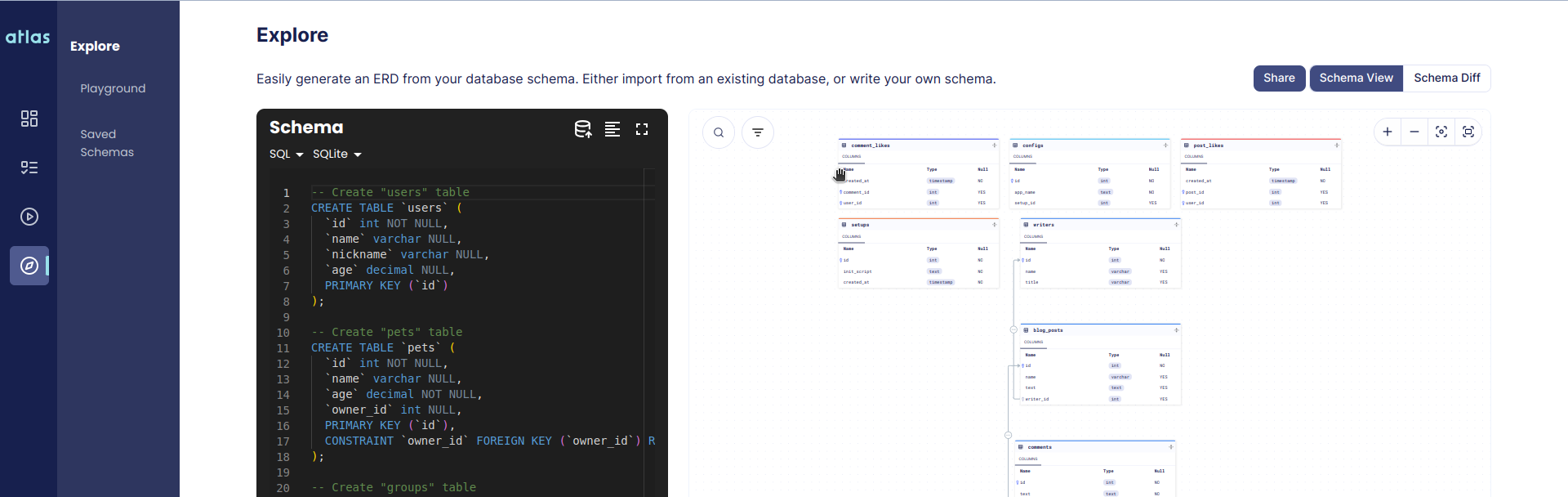](https://gh.atlasgo.cloud/explore/40d83919)
|
|
|
|
</TabItem>
|
|
<TabItem value="SQL Schema">
|
|
|
|
#### Inspect The Ent Schema
|
|
|
|
```bash
|
|
atlas schema inspect \
|
|
-u "ent://ent/schema" \
|
|
--dev-url "sqlite://file?mode=memory&_fk=1" \
|
|
--format '{{ sql . " " }}'
|
|
```
|
|
|
|
#### SQL Output
|
|
|
|
```sql
|
|
-- Create "cars" table
|
|
CREATE TABLE `cars` (
|
|
`id` integer NOT NULL PRIMARY KEY AUTOINCREMENT,
|
|
`model` text NOT NULL,
|
|
`registered_at` datetime NOT NULL,
|
|
`user_cars` integer NULL,
|
|
CONSTRAINT `cars_users_cars` FOREIGN KEY (`user_cars`) REFERENCES `users` (`id`) ON DELETE SET NULL
|
|
);
|
|
|
|
-- Create "users" table
|
|
CREATE TABLE `users` (
|
|
`id` integer NOT NULL PRIMARY KEY AUTOINCREMENT,
|
|
`age` integer NOT NULL,
|
|
`name` text NOT NULL DEFAULT 'unknown'
|
|
);
|
|
```
|
|
|
|
</TabItem>
|
|
</Tabs>
|
|
|
|
## Create Your Second Edge
|
|
|
|
We'll continue our example by creating a M2M (many-to-many) relationship between users and groups.
|
|
|
|

|
|
|
|
As you can see, each group entity can **have many** users, and a user can **be connected to many** groups;
|
|
a simple "many-to-many" relationship. In the above illustration, the `Group` schema is the owner
|
|
of the `users` edge (relation), and the `User` entity has a back-reference/inverse edge to this
|
|
relationship named `groups`. Let's define this relationship in our schemas:
|
|
|
|
```go title="entdemo/ent/schema/group.go"
|
|
// Edges of the Group.
|
|
func (Group) Edges() []ent.Edge {
|
|
return []ent.Edge{
|
|
edge.To("users", User.Type),
|
|
}
|
|
}
|
|
```
|
|
|
|
```go title="entdemo/ent/schema/user.go"
|
|
// Edges of the User.
|
|
func (User) Edges() []ent.Edge {
|
|
return []ent.Edge{
|
|
edge.To("cars", Car.Type),
|
|
// Create an inverse-edge called "groups" of type `Group`
|
|
// and reference it to the "users" edge (in Group schema)
|
|
// explicitly using the `Ref` method.
|
|
edge.From("groups", Group.Type).
|
|
Ref("users"),
|
|
}
|
|
}
|
|
```
|
|
|
|
We run `ent` on the schema directory to re-generate the assets.
|
|
```console
|
|
go generate ./ent
|
|
```
|
|
|
|
## Run Your First Graph Traversal
|
|
|
|
In order to run our first graph traversal, we need to generate some data (nodes and edges, or in other words,
|
|
entities and relations). Let's create the following graph using the framework:
|
|
|
|

|
|
|
|
|
|
```go title="entdemo/start.go"
|
|
func CreateGraph(ctx context.Context, client *ent.Client) error {
|
|
// First, create the users.
|
|
a8m, err := client.User.
|
|
Create().
|
|
SetAge(30).
|
|
SetName("Ariel").
|
|
Save(ctx)
|
|
if err != nil {
|
|
return err
|
|
}
|
|
neta, err := client.User.
|
|
Create().
|
|
SetAge(28).
|
|
SetName("Neta").
|
|
Save(ctx)
|
|
if err != nil {
|
|
return err
|
|
}
|
|
// Then, create the cars, and attach them to the users created above.
|
|
err = client.Car.
|
|
Create().
|
|
SetModel("Tesla").
|
|
SetRegisteredAt(time.Now()).
|
|
// Attach this car to Ariel.
|
|
SetOwner(a8m).
|
|
Exec(ctx)
|
|
if err != nil {
|
|
return err
|
|
}
|
|
err = client.Car.
|
|
Create().
|
|
SetModel("Mazda").
|
|
SetRegisteredAt(time.Now()).
|
|
// Attach this car to Ariel.
|
|
SetOwner(a8m).
|
|
Exec(ctx)
|
|
if err != nil {
|
|
return err
|
|
}
|
|
err = client.Car.
|
|
Create().
|
|
SetModel("Ford").
|
|
SetRegisteredAt(time.Now()).
|
|
// Attach this car to Neta.
|
|
SetOwner(neta).
|
|
Exec(ctx)
|
|
if err != nil {
|
|
return err
|
|
}
|
|
// Create the groups, and add their users in the creation.
|
|
err = client.Group.
|
|
Create().
|
|
SetName("GitLab").
|
|
AddUsers(neta, a8m).
|
|
Exec(ctx)
|
|
if err != nil {
|
|
return err
|
|
}
|
|
err = client.Group.
|
|
Create().
|
|
SetName("GitHub").
|
|
AddUsers(a8m).
|
|
Exec(ctx)
|
|
if err != nil {
|
|
return err
|
|
}
|
|
log.Println("The graph was created successfully")
|
|
return nil
|
|
}
|
|
```
|
|
|
|
Now when we have a graph with data, we can run a few queries on it:
|
|
|
|
1. Get all user's cars within the group named "GitHub":
|
|
|
|
```go title="entdemo/start.go"
|
|
func QueryGithub(ctx context.Context, client *ent.Client) error {
|
|
cars, err := client.Group.
|
|
Query().
|
|
Where(group.Name("GitHub")). // (Group(Name=GitHub),)
|
|
QueryUsers(). // (User(Name=Ariel, Age=30),)
|
|
QueryCars(). // (Car(Model=Tesla, RegisteredAt=<Time>), Car(Model=Mazda, RegisteredAt=<Time>),)
|
|
All(ctx)
|
|
if err != nil {
|
|
return fmt.Errorf("failed getting cars: %w", err)
|
|
}
|
|
log.Println("cars returned:", cars)
|
|
// Output: (Car(Model=Tesla, RegisteredAt=<Time>), Car(Model=Mazda, RegisteredAt=<Time>),)
|
|
return nil
|
|
}
|
|
```
|
|
|
|
2. Change the query above, so that the source of the traversal is the user *Ariel*:
|
|
|
|
```go title="entdemo/start.go"
|
|
func QueryArielCars(ctx context.Context, client *ent.Client) error {
|
|
// Get "Ariel" from previous steps.
|
|
a8m := client.User.
|
|
Query().
|
|
Where(
|
|
user.HasCars(),
|
|
user.Name("Ariel"),
|
|
).
|
|
OnlyX(ctx)
|
|
cars, err := a8m. // Get the groups, that a8m is connected to:
|
|
QueryGroups(). // (Group(Name=GitHub), Group(Name=GitLab),)
|
|
QueryUsers(). // (User(Name=Ariel, Age=30), User(Name=Neta, Age=28),)
|
|
QueryCars(). //
|
|
Where( //
|
|
car.Not( // Get Neta and Ariel cars, but filter out
|
|
car.Model("Mazda"), // those who named "Mazda"
|
|
), //
|
|
). //
|
|
All(ctx)
|
|
if err != nil {
|
|
return fmt.Errorf("failed getting cars: %w", err)
|
|
}
|
|
log.Println("cars returned:", cars)
|
|
// Output: (Car(Model=Tesla, RegisteredAt=<Time>), Car(Model=Ford, RegisteredAt=<Time>),)
|
|
return nil
|
|
}
|
|
```
|
|
|
|
3. Get all groups that have users (query with a look-aside predicate):
|
|
|
|
```go title="entdemo/start.go"
|
|
func QueryGroupWithUsers(ctx context.Context, client *ent.Client) error {
|
|
groups, err := client.Group.
|
|
Query().
|
|
Where(group.HasUsers()).
|
|
All(ctx)
|
|
if err != nil {
|
|
return fmt.Errorf("failed getting groups: %w", err)
|
|
}
|
|
log.Println("groups returned:", groups)
|
|
// Output: (Group(Name=GitHub), Group(Name=GitLab),)
|
|
return nil
|
|
}
|
|
```
|
|
|
|
## Schema Migration
|
|
|
|
Ent provides two approaches for running schema migrations: [Automatic Migrations](/docs/migrate) and
|
|
[Versioned migrations](/docs/versioned-migrations). Here is a brief overview of each approach:
|
|
|
|
### Automatic Migrations
|
|
|
|
With Automatic Migrations, users can use the following API to keep the database schema aligned with the schema objects
|
|
defined in the generated SQL schema `ent/migrate/schema.go`:
|
|
```go
|
|
if err := client.Schema.Create(ctx); err != nil {
|
|
log.Fatalf("failed creating schema resources: %v", err)
|
|
}
|
|
```
|
|
|
|
This approach is mostly useful for prototyping, development, or testing. Therefore, it is recommended to use the
|
|
_Versioned Migration_ approach for mission-critical production environments. By using versioned migrations, users know
|
|
beforehand what changes are being applied to their database, and can easily tune them depending on their needs.
|
|
|
|
Read more about this approach in the [Automatic Migration](/docs/migrate) documentation.
|
|
|
|
### Versioned Migrations
|
|
|
|
Unlike _Automatic Migrations_, the _Version Migrations_ approach uses Atlas to automatically generate a set of migration
|
|
files containing the necessary SQL statements to migrate the database. These files can be edited to meet specific needs
|
|
and applied using existing migration tools like Atlas, golang-migrate, Flyway, and Liquibase. The API for this approach
|
|
involves two primary steps.
|
|
|
|
#### Generating migrations
|
|
|
|
<AtlasMigrateDiff/>
|
|
|
|
#### Applying migrations
|
|
|
|
<AtlasMigrateApply/>
|
|
|
|
Read more about this approach in the [Versioned Migrations](/docs/versioned-migrations) documentation.
|
|
|
|
## Full Example
|
|
|
|
The full example exists in [GitHub](https://github.com/ent/ent/tree/master/examples/start).
|