 7017cbc898
* dialect/sql/schema: file based type store

This PR adds support for a file based type storage when using versioned migrations. The file called `.ent_types` is written to the migration directory alongside the migration files and will be kept in sync for every migration file generation run.

In order to not break existing code, where the type storage might differ for different deployment, global unique ID mut be enabled by using a new option. This will also be raised as an error to the user when attempting to use versioned migrations and global unique ID.

Documentation will be added to this PR once feedback on the code is gathered.

* apply CR

* fix tests

* change format of types file to exclude it from atlas.sum file

* docs and drift test

* apply CR
15 KiB
id, title
| id | title |
|---|---|
| versioned-migrations | Versioned Migrations |
If you are using the Atlas migration engine you are able to use the versioned migrations feature of it. Instead of applying the computed changes directly to the database, it will generate a set of migration files containing the necessary SQL statements to migrate the database. These files can then be edited to your needs and be applied by any tool you like (like golang-migrate, Flyway, liquibase).
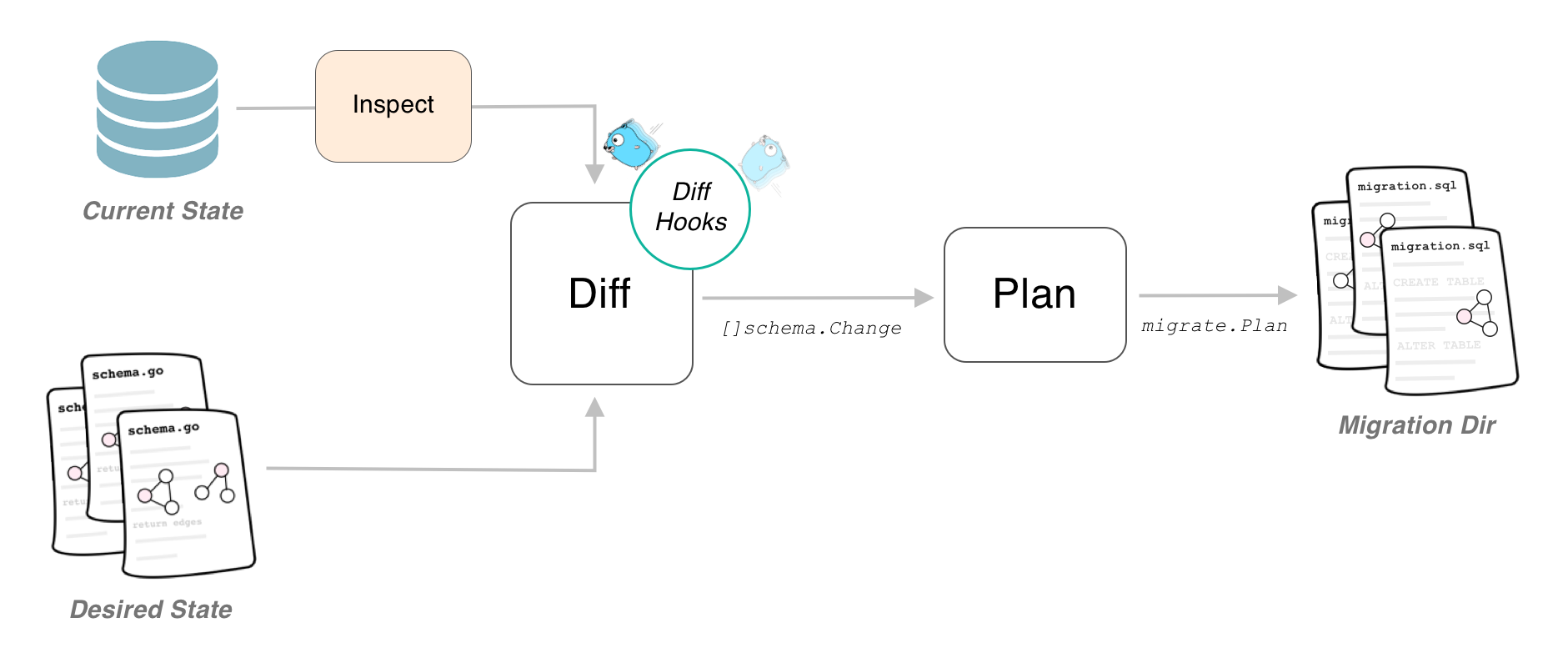
Generating Versioned Migration Files
From Client
If you want to use an instantiated Ent client to create new migration files, you have to enable the versioned migrations feature flag in order to have Ent make the necessary changes to the generated code. Depending on how you execute the Ent code generator, you have to use one of the two options:
- If you are using the default go generate configuration, simply add the
--feature sql/versioned-migrationto theent/generate.gofile as follows:
package ent

//go:generate go run -mod=mod entgo.io/ent/cmd/ent generate --feature sql/versioned-migration ./schema
- If you are using the code generation package (e.g. if you are using an Ent extension), add the feature flag as follows:
//go:build ignore

package main

import (
	"log"

	"entgo.io/ent/entc"
	"entgo.io/ent/entc/gen"
)

func main() {
	err := entc.Generate("./schema", &gen.Config{}, entc.FeatureNames("sql/versioned-migration"))
	if err != nil {
		log.Fatalf("running ent codegen: %v", err)
	}
}
After regenerating the project, there will be an extra Diff method on the Ent client that you can use to inspect the
connected database, compare it with the schema definitions and create SQL statements needed to migrate the database to
the graph.
package main

import (
    "context"
    "log"

    "<project>/ent"

    "ariga.io/atlas/sql/migrate"
    "entgo.io/ent/dialect/sql/schema"
   _ "github.com/go-sql-driver/mysql"
)

func main() {
	client, err := ent.Open("mysql", "root:pass@tcp(localhost:3306)/test")
	if err != nil {
		log.Fatalf("failed connecting to mysql: %v", err)
	}
	defer client.Close()
	ctx := context.Background()
	// Create a local migration directory.
	dir, err := migrate.NewLocalDir("migrations")
	if err != nil {
		log.Fatalf("failed creating atlas migration directory: %v", err)
	}
	// Write migration diff.
	err = client.Schema.Diff(ctx, schema.WithDir(dir))
	// You can use the following method to give the migration files a name.
	// err = client.Schema.NamedDiff(ctx, "migration_name", schema.WithDir(dir))
	if err != nil {
		log.Fatalf("failed creating schema resources: %v", err)
	}
}
You can then create a new set of migration files by simply calling go run -mod=mod main.go.
From Graph
You can also generate new migration files without an instantiated Ent client. This can be useful if you want to make the migration file creation part of a go generate workflow. Note, that in this case enabling the feature flag is optional.
package main

import (
    "context"
    "log"

    "ariga.io/atlas/sql/migrate"
    "entgo.io/ent/dialect/sql"
    "entgo.io/ent/dialect/sql/schema"
    "entgo.io/ent/entc"
    "entgo.io/ent/entc/gen"
)

func main() {
    // Load the graph.
    graph, err := entc.LoadGraph("./schema", &gen.Config{})
    if err != nil {
        log.Fatalln(err)
    }
    tbls, err := graph.Tables()
    if err != nil {
        log.Fatalln(err)
    }
    // Create a local migration directory.
    d, err := migrate.NewLocalDir("migrations")
    if err != nil {
        log.Fatalln(err)
    }
    // Open connection to the database.
    dlct, err := sql.Open("mysql", "root:pass@tcp(localhost:3306)/test")
    if err != nil {
        log.Fatalln(err)
    }
    // Inspect it and compare it with the graph.
    m, err := schema.NewMigrate(dlct, schema.WithDir(d))
    if err != nil {
        log.Fatalln(err)
    }
    if err := m.Diff(context.Background(), tbls...); err != nil {
        log.Fatalln(err)
    }
    // You can use the following method to give the migration files a name.
    // if err := m.NamedDiff(context.Background(), "migration_name", tbls...); err != nil {
    //     log.Fatalln(err)
    // }
}
Apply Migrations
The Atlas migration engine does not support applying the migration files onto a database yet, therefore to manage and execute the generated migration files, you have to rely on an external tool (or execute them by hand). By default, Atlas generates one "up" and one "down" migration file for the computed diff. These files are compatible with the popular golang-migrate/migrate package, and you can use that tool to manage the migrations in your deployments.
migrate -source file://migrations -database mysql://root:pass@tcp(localhost:3306)/test up
Moving from Auto-Migration to Versioned Migrations
In case you already have an Ent application in production and want to switch over from auto migration to the new versioned migration, you need to take some extra steps.
Create an initial migration file reflecting the currently deployed state
To do this make sure your schema definition is in sync with your deployed version. Then spin up an empty database and
run the diff command once as described above. This will create the statements needed to create the current state of
your schema graph.
If you happened to have universal IDs enabled before, the above command will create a
file called .ent_types containing a list of schema names similar to the following:
atlas.sum ignore
users,groups
Once that has been created, one of the migration files will contain statements to create a table called
ent_types, as well as some inserts to it:
CREATE TABLE `users` (`id` integer NOT NULL PRIMARY KEY AUTOINCREMENT);
CREATE TABLE `groups` (`id` integer NOT NULL PRIMARY KEY AUTOINCREMENT);
INSERT INTO sqlite_sequence (name, seq) VALUES ("groups", 4294967296);
CREATE TABLE `ent_types` (`id` integer NOT NULL PRIMARY KEY AUTOINCREMENT, `type` text NOT NULL);
CREATE UNIQUE INDEX `ent_types_type_key` ON `ent_types` (`type`);
INSERT INTO `ent_types` (`type`) VALUES ('users'), ('groups');
In order to ensure to not break existing code, make sure the contents of that file are equal to the contents in the
table present in the database you created the diff from. For example, if you consider the .ent_types file from
above (users,groups) but your deployed table looks like the one below (groups,users):
| id | type |
|---|---|
| 1 | groups |
| 2 | users |
You can see, that the order differs. In that case, you have to manually change both the entries in the
.ent_types file, as well in the generated migrations file. As a safety feature, Ent will warn you about type
drifts if you attempt to run a migration diff.
Configure the tool you use to manage migrations to consider this file as applied
In case of golang-migrate this can be done by forcing your database version as
described here.
Use a Custom Formatter
Atlas' migration engine comes with great customizability. By the use of a custom Formatter you can generate the
migration files in a format compatible with other migration management tools and Atlas has built-in support for the
following four:
:::note You need to have the latest master of Ent installed for this to be working.
go get -u entgo.io/ent@master
:::
package main

import (
   "context"
   "log"
   "strings"
   "text/template"
   "time"

   "ariga.io/atlas/sql/migrate"
   "ariga.io/atlas/sql/sqltool"
   "entgo.io/ent/dialect/sql"
   "entgo.io/ent/dialect/sql/schema"
   "entgo.io/ent/entc"
   "entgo.io/ent/entc/gen"
)

func main() {
   // Load the graph.
   graph, err := entc.LoadGraph("/.schema", &gen.Config{})
   if err != nil {
      log.Fatalln(err)
   }
   tbls, err := graph.Tables()
   if err != nil {
      log.Fatalln(err)
   }
   // Create a local migration directory.
   d, err := migrate.NewLocalDir("migrations")
   if err != nil {
      log.Fatalln(err)
   }
   // Open connection to the database.
   dlct, err := sql.Open("mysql", "root:pass@tcp(localhost:3306)/test")
   if err != nil {
      log.Fatalln(err)
   }
   // Inspect it and compare it with the graph.
   m, err := schema.NewMigrate(dlct, schema.WithDir(d),
      // highlight-start
      // Chose one of the below.
      schema.WithFormatter(sqltool.GolangMigrateFormatter),
      schema.WithFormatter(sqltool.GooseFormatter),
      schema.WithFormatter(sqltool.FlywayFormatter),
      schema.WithFormatter(sqltool.LiquibaseFormatter),
      // highlight-end
   )
   if err != nil {
      log.Fatalln(err)
   }
   if err := m.Diff(context.Background(), tbls...); err != nil {
      log.Fatalln(err)
   }
}
Note for using golang-migrate
If you use golang-migrate with MySQL, you need to add the multiStatements parameter to true as in the example below and then take the DSN we used in the documents with the param applied.
"user:password@tcp(host:port)/dbname?multiStatements=true"
Atlas migration directory integrity file
The Problem
Suppose you have multiple teams develop a feature in parallel and both of them need a migration. If Team A and Team B do not check in with each other, they might end up with a broken set of migration files (like adding the same table or column twice) since new files do not raise a merge conflict in a version control system like git. The following example demonstrates such behavior:

Assume both Team A and Team B add a new schema called User and generate a versioned migration file on their respective branch.
-- create "users" table
CREATE TABLE `users` (
    `id` bigint NOT NULL AUTO_INCREMENT,
    // highlight-start
    `team_a_col` INTEGER NOT NULL,
    // highlight-end
    PRIMARY KEY (`id`)
) CHARSET utf8mb4 COLLATE utf8mb4_bin;
-- create "users" table
CREATE TABLE `users` (
    `id` bigint NOT NULL AUTO_INCREMENT,
    // highlight-start
     `team_b_col` INTEGER NOT NULL,
    // highlight-end
     PRIMARY KEY (`id`)
) CHARSET utf8mb4 COLLATE utf8mb4_bin;
If they both merge their branch into master, git will not raise a conflict and everything seems fine. But attempting to apply the pending migrations will result in migration failure:
mysql> CREATE TABLE `users` (`id` bigint NOT NULL AUTO_INCREMENT, `team_a_col` INTEGER NOT NULL, PRIMARY KEY (`id`)) CHARSET utf8mb4 COLLATE utf8mb4_bin;
[2022-04-14 10:00:38] completed in 31 ms

mysql> CREATE TABLE `users` (`id` bigint NOT NULL AUTO_INCREMENT, `team_b_col` INTEGER NOT NULL, PRIMARY KEY (`id`)) CHARSET utf8mb4 COLLATE utf8mb4_bin;
[2022-04-14 10:00:48] [42S01][1050] Table 'users' already exists
Depending on the SQL this can potentially leave your database in a crippled state.
The Solution
Luckily, the Atlas migration engine offers a way to prevent concurrent creation of new migration files and guard against
accidental changes in the migration history we call Migration Directory Integrity File, which simply is another file
in your migration directory called atlas.sum. For the migration directory of team A it would look similar to this:
h1:KRFsSi68ZOarsQAJZ1mfSiMSkIOZlMq4RzyF//Pwf8A=
20220318104614_team_A.sql h1:EGknG5Y6GQYrc4W8e/r3S61Aqx2p+NmQyVz/2m8ZNwA=
The atlas.sum file contains the checksum of each migration file (implemented by a reverse, one branch merkle hash
tree), and a sum of all files. Adding new files results in a change to the sum file, which will raise merge conflicts in
most version controls systems. Let's see how we can use the Migration Directory Integrity File to detect the case
from above automatically.
:::note Please note, that you need to have the Atlas CLI installed in your system for this to work, so make sure to follow the installation instructions before proceeding. :::
The first step is to tell the migration engine to create a sum file by using the schema.WithSumFile() option:
package main

import (
   "context"
   "log"

   "ariga.io/atlas/sql/migrate"
   "ariga.io/atlas/sql/sqltool"
   "entgo.io/ent/dialect/sql"
   "entgo.io/ent/dialect/sql/schema"
   "entgo.io/ent/entc"
   "entgo.io/ent/entc/gen"
)

func main() {
   // Load the graph.
   graph, err := entc.LoadGraph("/.schema", &gen.Config{})
   if err != nil {
      log.Fatalln(err)
   }
   tbls, err := graph.Tables()
   if err != nil {
      log.Fatalln(err)
   }
   // Create a local migration directory.
   d, err := migrate.NewLocalDir("migrations")
   if err != nil {
      log.Fatalln(err)
   }
   // Open connection to the database.
   dlct, err := sql.Open("mysql", "root:pass@tcp(localhost:3306)/test")
   if err != nil {
      log.Fatalln(err)
   }
   // Inspect it and compare it with the graph.
   m, err := schema.NewMigrate(dlct, schema.WithDir(d),
      // highlight-start
      // Enable the Atlas Migration Directory Integrity File.
      schema.WithSumFile(),
      // highlight-end
   )
   if err != nil {
      log.Fatalln(err)
   }
   if err := m.Diff(context.Background(), tbls...); err != nil {
      log.Fatalln(err)
   }
}
In addition to the usual .sql migration files the migration directory will contain the atlas.sum file. Every time
you let Ent generate a new migration file, this file is updated for you. However, every manual change made to the
mitration directory will render the migration directory and the atlas.sum file out-of-sync. With the Atlas CLI you can
both check if the file and migration directory are in-sync, and fix it if not:
# If there is no output, the migration directory is in-sync.
atlas migrate validate --dir file://<path-to-your-migration-directory>
# If the migration directory and sum file are out-of-sync the Atlas CLI will tell you.
atlas migrate validate --dir file://<path-to-your-migration-directory>
Error: checksum mismatch

You have a checksum error in your migration directory.
This happens if you manually create or edit a migration file.
Please check your migration files and run

'atlas migrate hash --force'

to re-hash the contents and resolve the error.

exit status 1
If you are sure, that the contents in your migration files are correct, you can re-compute the hashes in the atlas.sum
file:
# Recompute the sum file.
atlas migrate hash --dir file://<path-to-your-migration-directory> --force
Back to the problem above, if team A would land their changes on master first and team B would now attempt to land theirs, they'd get a merge conflict, as you can see in the example below:

You can add the atlas migrate validate call to your CI to have the migration directory checked continuously. Even if
any team member would now forget to update the atlas.sum file after a manual edit, the CI would not go green,
indicating a problem.