
15 KiB
Executable File
id, title
| id | title |
|---|---|
| schema-fields | Fields |
Quick Summary
Fields (or properties) in the schema are the attributes of the node. For example, a User
with 4 fields: age, name, username and created_at:
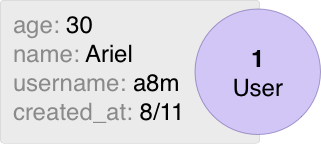
Fields are returned from the schema using the Fields method. For example:
package schema

import (
	"time"

	"entgo.io/ent"
	"entgo.io/ent/schema/field"
)

// User schema.
type User struct {
	ent.Schema
}

// Fields of the user.
func (User) Fields() []ent.Field {
	return []ent.Field{
		field.Int("age"),
		field.String("name"),
		field.String("username").
			Unique(),
		field.Time("created_at").
			Default(time.Now),
	}
}
All fields are required by default, and can be set to optional using the Optional method.
Types
The following types are currently supported by the framework:
- All Go numeric types. Like
int,uint8,float64, etc. boolstringtime.TimeUUID[]byte(SQL only).JSON(SQL only).Enum(SQL only).Other(SQL only).
package schema

import (
	"time"
	"net/url"

	"github.com/google/uuid"
	"entgo.io/ent"
	"entgo.io/ent/schema/field"
)

// User schema.
type User struct {
	ent.Schema
}

// Fields of the user.
func (User) Fields() []ent.Field {
	return []ent.Field{
		field.Int("age").
			Positive(),
		field.Float("rank").
			Optional(),
		field.Bool("active").
			Default(false),
		field.String("name").
			Unique(),
		field.Time("created_at").
			Default(time.Now),
		field.JSON("url", &url.URL{}).
			Optional(),
		field.JSON("strings", []string{}).
			Optional(),
		field.Enum("state").
			Values("on", "off").
			Optional(),
		field.UUID("uuid", uuid.UUID{}).
			Default(uuid.New),
	}
}
To read more about how each type is mapped to its database-type, go to the Migration section.
ID Field
The id field is builtin in the schema and does not need declaration. In SQL-based
databases, its type defaults to int (but can be changed with a codegen option)
and auto-incremented in the database.
In order to configure the id field to be unique across all tables, use the
WithGlobalUniqueID option when running schema migration.
If a different configuration for the id field is needed, or the id value should
be provided on entity creation by the application (e.g. UUID), override the builtin
id configuration. For example:
// Fields of the Group.
func (Group) Fields() []ent.Field {
	return []ent.Field{
		field.Int("id").
			StructTag(`json:"oid,omitempty"`),
	}
}

// Fields of the Blob.
func (Blob) Fields() []ent.Field {
	return []ent.Field{
		field.UUID("id", uuid.UUID{}).
			Default(uuid.New).
			StorageKey("oid"),
	}
}

// Fields of the Pet.
func (Pet) Fields() []ent.Field {
	return []ent.Field{
		field.String("id").
			MaxLen(25).
			NotEmpty().
			Unique().
			Immutable(),
	}
}
If you need to set a custom function to generate IDs, you can use DefaultFunc
to specify a function which will always be ran when the resource is created.
See the related FAQ for more information.
// Fields of the User.
func (User) Fields() []ent.Field {
	return []ent.Field{
		field.Int64("id").
			DefaultFunc(func() int64 {
				// An example of a dumb ID generator - use a production-ready alternative instead.
				return time.Now().Unix() << 8 | atomic.AddInt64(&counter, 1) % 256
			}),
	}
}
Database Type
Each database dialect has its own mapping from Go type to database type. For example,
the MySQL dialect creates float64 fields as double columns in the database. However,
there is an option to override the default behavior using the SchemaType method.
package schema

import (
    "entgo.io/ent"
    "entgo.io/ent/dialect"
    "entgo.io/ent/schema/field"
)

// Card schema.
type Card struct {
    ent.Schema
}

// Fields of the Card.
func (Card) Fields() []ent.Field {
	return []ent.Field{
		field.Float("amount").
			SchemaType(map[string]string{
				dialect.MySQL:    "decimal(6,2)",   // Override MySQL.
				dialect.Postgres: "numeric",        // Override Postgres.
			}),
	}
}
Go Type
The default type for fields are the basic Go types. For example, for string fields, the type is string,
and for time fields, the type is time.Time. The GoType method provides an option to override the
default ent type with a custom one.
The custom type must be either a type that is convertible to the Go basic type, or a type that implements the ValueScanner interface.
package schema

import (
    "database/sql"

    "entgo.io/ent"
    "entgo.io/ent/dialect"
    "entgo.io/ent/schema/field"
    "github.com/shopspring/decimal"
)

// Amount is a custom Go type that's convertible to the basic float64 type.
type Amount float64

// Card schema.
type Card struct {
    ent.Schema
}

// Fields of the Card.
func (Card) Fields() []ent.Field {
	return []ent.Field{
		field.Float("amount").
			GoType(Amount(0)),
		field.String("name").
			Optional().
			// A ValueScanner type.
			GoType(&sql.NullString{}),
		field.Enum("role").
			// A convertible type to string.
			GoType(role.Unknown),
		field.Float("decimal").
			// A ValueScanner type mixed with SchemaType.
			GoType(decimal.Decimal{}).
			SchemaType(map[string]string{
			    dialect.MySQL:    "decimal(6,2)",
			    dialect.Postgres: "numeric",
			}),
	}
}
Other Field
Other represents a field that is not a good fit for any of the standard field types. Examples are a Postgres Range type or Geospatial type
package schema

import (
	"entgo.io/ent"
	"entgo.io/ent/dialect"
	"entgo.io/ent/schema/field"

	"github.com/jackc/pgtype"
)

// User schema.
type User struct {
	ent.Schema
}

// Fields of the User.
func (User) Fields() []ent.Field {
	return []ent.Field{
		field.Other("duration", &pgtype.Tstzrange{}).
			SchemaType(map[string]string{
				dialect.Postgres: "tstzrange",
			}),
	}
}
Default Values
Non-unique fields support default values using the Default and UpdateDefault methods.
You can also specify DefaultFunc instead to have a custom generator.
// Fields of the User.
func (User) Fields() []ent.Field {
	return []ent.Field{
		field.Time("created_at").
			Default(time.Now),
		field.Time("updated_at").
			Default(time.Now).
			UpdateDefault(time.Now),
		field.String("name").
			Default("unknown"),
		field.String("cuid").
			DefaultFunc(cuid.New),
	}
}
SQL-specific expressions like function calls can be added to default value configuration using the
entsql.Annotation:
// Fields of the User.
func (User) Fields() []ent.Field {
	return []ent.Field{
		// Add a new field with CURRENT_TIMESTAMP
		// as a default value to all previous rows.
		field.Time("created_at").
			Default(time.Now).
			Annotations(&entsql.Annotation{
				Default: "CURRENT_TIMESTAMP",
			}),
	}
}
In case your DefaultFunc is also returning an error, it is better to handle it properly using schema-hooks.
See this FAQ for more information.
Validators
A field validator is a function from type func(T) error that is defined in the schema
using the Validate method, and applied on the field value before creating or updating
the entity.
The supported types of field validators are string and all numeric types.
package schema

import (
	"errors"
	"regexp"
	"strings"
	"time"

	"entgo.io/ent"
	"entgo.io/ent/schema/field"
)


// Group schema.
type Group struct {
	ent.Schema
}

// Fields of the group.
func (Group) Fields() []ent.Field {
	return []ent.Field{
		field.String("name").
			Match(regexp.MustCompile("[a-zA-Z_]+$")).
			Validate(func(s string) error {
				if strings.ToLower(s) == s {
					return errors.New("group name must begin with uppercase")
				}
				return nil
			}),
	}
}
Here is another example for writing a reusable validator:
// MaxRuneCount validates the rune length of a string by using the unicode/utf8 package.
func MaxRuneCount(maxLen int) func(s string) error {
	return func(s string) error {
		if utf8.RuneCountInString(s) > maxLen {
			return errors.New("value is more than the max length")
		}
		return nil
	}
}

field.String("name").
	Validate(MaxRuneCount(10))
field.String("nickname").
	Validate(MaxRuneCount(20))
Built-in Validators
The framework provides a few built-in validators for each type:
-
Numeric types:
Positive()Negative()NonNegative()Min(i)- Validate that the given value is > i.Max(i)- Validate that the given value is < i.Range(i, j)- Validate that the given value is within the range [i, j].
-
stringMinLen(i)MaxLen(i)Match(regexp.Regexp)NotEmpty
Optional
Optional fields are fields that are not required in the entity creation, and
will be set to nullable fields in the database.
Unlike edges, fields are required by default, and setting them to
optional should be done explicitly using the Optional method.
// Fields of the user.
func (User) Fields() []ent.Field {
	return []ent.Field{
		field.String("required_name"),
		field.String("optional_name").
			Optional(),
	}
}
Nillable
Sometimes you want to be able to distinguish between the zero value of fields
and nil; for example, if the database column contains 0 or NULL.
The Nillable option exists exactly for this.
If you have an Optional field of type T, setting it to Nillable will generate
a struct field with type *T. Hence, if the database returns NULL for this field,
the struct field will be nil. Otherwise, it will contain a pointer to the actual data.
For example, given this schema:
// Fields of the user.
func (User) Fields() []ent.Field {
	return []ent.Field{
		field.String("required_name"),
		field.String("optional_name").
			Optional(),
		field.String("nillable_name").
			Optional().
			Nillable(),
	}
}
The generated struct for the User entity will be as follows:
// ent/user.go
package ent

// User entity.
type User struct {
	RequiredName string `json:"required_name,omitempty"`
	OptionalName string `json:"optional_name,omitempty"`
	NillableName *string `json:"nillable_name,omitempty"`
}
Immutable
Immutable fields are fields that can be set only in the creation of the entity. i.e., no setters will be generated for the entity updater.
// Fields of the user.
func (User) Fields() []ent.Field {
	return []ent.Field{
		field.String("name"),
		field.Time("created_at").
			Default(time.Now).
			Immutable(),
	}
}
Uniqueness
Fields can be defined as unique using the Unique method.
Note that unique fields cannot have default values.
// Fields of the user.
func (User) Fields() []ent.Field {
	return []ent.Field{
		field.String("name"),
		field.String("nickname").
			Unique(),
	}
}
Storage Key
Custom storage name can be configured using the StorageKey method.
It's mapped to a column name in SQL dialects and to property name in Gremlin.
// Fields of the user.
func (User) Fields() []ent.Field {
	return []ent.Field{
		field.String("name").
			StorageKey("old_name"),
	}
}
Indexes
Indexes can be defined on multi fields and some types of edges as well. However, you should note, that this is currently an SQL-only feature.
Read more about this in the Indexes section.
Struct Tags
Custom struct tags can be added to the generated entities using the StructTag
method. Note that if this option was not provided, or provided and did not
contain the json tag, the default json tag will be added with the field name.
// Fields of the user.
func (User) Fields() []ent.Field {
	return []ent.Field{
		field.String("name").
			StructTag(`gqlgen:"gql_name"`),
	}
}
Additional Struct Fields
By default, ent generates the entity model with fields that are configured in the schema.Fields method.
For example, given this schema configuration:
// User schema.
type User struct {
	ent.Schema
}

// Fields of the user.
func (User) Fields() []ent.Field {
	return []ent.Field{
		field.Int("age").
			Optional().
			Nillable(),
		field.String("name").
			StructTag(`gqlgen:"gql_name"`),
	}
}
The generated model will be as follows:
// User is the model entity for the User schema.
type User struct {
	// Age holds the value of the "age" field.
	Age  *int	`json:"age,omitempty"`
	// Name holds the value of the "name" field.
	Name string `json:"name,omitempty" gqlgen:"gql_name"`
}
In order to add additional fields to the generated struct that are not stored in the database, use external templates. For example:
{{ define "model/fields/additional" }}
	{{- if eq $.Name "User" }}
		// StaticField defined by template.
		StaticField string `json:"static,omitempty"`
	{{- end }}
{{ end }}
The generated model will be as follows:
// User is the model entity for the User schema.
type User struct {
	// Age holds the value of the "age" field.
	Age  *int	`json:"age,omitempty"`
	// Name holds the value of the "name" field.
	Name string `json:"name,omitempty" gqlgen:"gql_name"`
	// StaticField defined by template.
	StaticField string `json:"static,omitempty"`
}
Sensitive Fields
String fields can be defined as sensitive using the Sensitive method. Sensitive fields
won't be printed and they will be omitted when encoding.
Note that sensitive fields cannot have struct tags.
// User schema.
type User struct {
	ent.Schema
}

// Fields of the user.
func (User) Fields() []ent.Field {
	return []ent.Field{
		field.String("password").
			Sensitive(),
	}
}
Annotations
Annotations is used to attach arbitrary metadata to the field object in code generation.
Template extensions can retrieve this metadata and use it inside their templates.
Note that the metadata object must be serializable to a JSON raw value (e.g. struct, map or slice).
// User schema.
type User struct {
	ent.Schema
}

// Fields of the user.
func (User) Fields() []ent.Field {
	return []ent.Field{
		field.Time("creation_date").
			Annotations(entgql.Annotation{
				OrderField: "CREATED_AT",
			}),
	}
}
Read more about annotations and their usage in templates in the template doc.
Naming Convention
By convention field names should use snake_case. The corresponding struct fields generated by ent will follow the Go convention
of using PascalCase. In cases where PascalCase is desired, you can do so with the StorageKey or StructTag methods.