mirror of
https://github.com/ent/ent.git
synced 2026-05-24 09:31:56 +03:00

427 lines
14 KiB
Markdown
427 lines
14 KiB
Markdown
---
|
|
id: versioned-migrations
|
|
title: Versioned Migrations
|
|
---
|
|
|
|
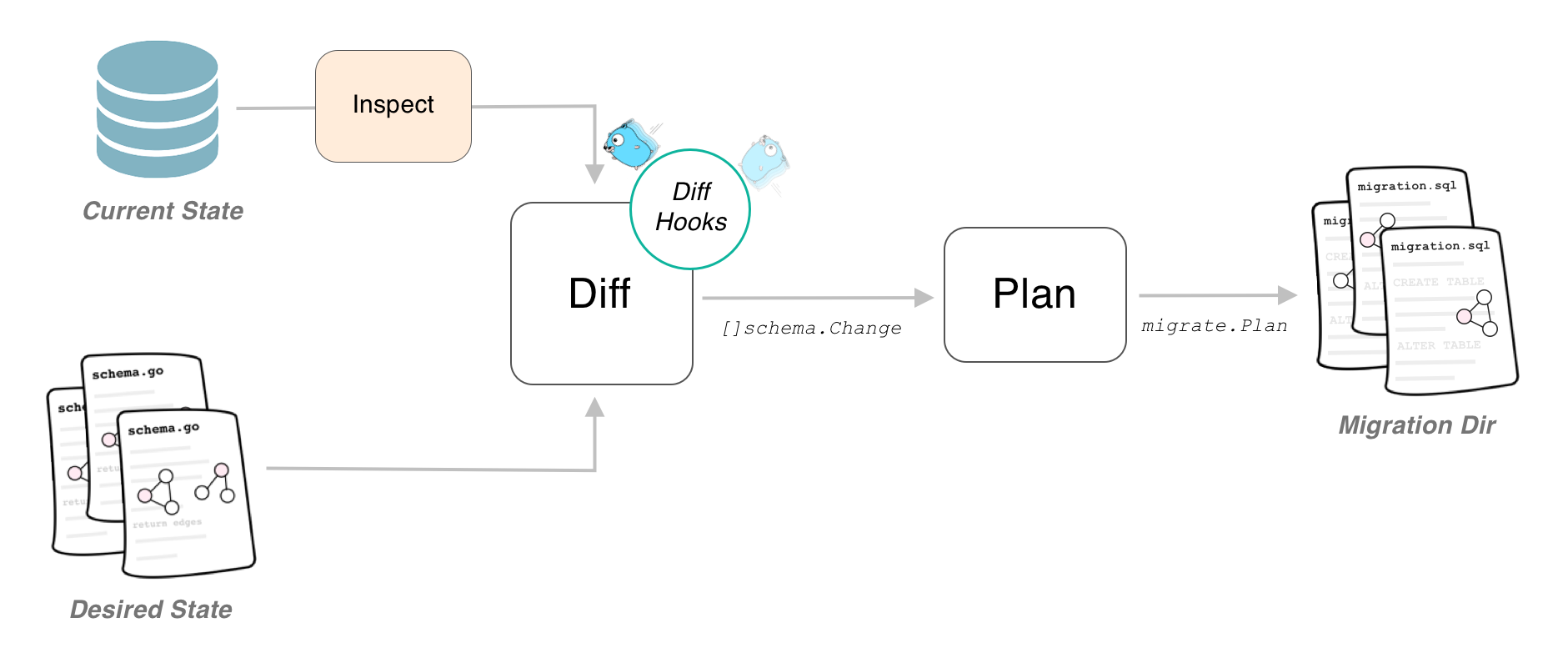
If you are using the Atlas migration engine you are able to use the versioned migrations feature of it. Instead of
|
|
applying the computed changes directly to the database, it will generate a set of migration files containing the
|
|
necessary SQL statements to migrate the database. These files can then be edited to your needs and be applied by any
|
|
tool you like (like golang-migrate, Flyway, liquibase).
|
|
|
|
|
|
|
|
## Generating Versioned Migration Files
|
|
|
|
### From Client
|
|
|
|
If you want to use an instantiated Ent client to create new migration files, you have to enable the versioned
|
|
migrations feature flag in order to have Ent make the necessary changes to the generated code. Depending on how you
|
|
execute the Ent code generator, you have to use one of the two options:
|
|
|
|
1. If you are using the default go generate configuration, simply add the `--feature sql/versioned-migration` to
|
|
the `ent/generate.go` file as follows:
|
|
|
|
```go
|
|
package ent
|
|
|
|
//go:generate go run -mod=mod entgo.io/ent/cmd/ent generate --feature sql/versioned-migration ./schema
|
|
```
|
|
|
|
2. If you are using the code generation package (e.g. if you are using an Ent extension), add the feature flag as
|
|
follows:
|
|
|
|
```go
|
|
//go:build ignore
|
|
|
|
package main
|
|
|
|
import (
|
|
"log"
|
|
|
|
"entgo.io/ent/entc"
|
|
"entgo.io/ent/entc/gen"
|
|
)
|
|
|
|
func main() {
|
|
err := entc.Generate("./schema", &gen.Config{}, entc.FeatureNames("sql/versioned-migration"))
|
|
if err != nil {
|
|
log.Fatalf("running ent codegen: %v", err)
|
|
}
|
|
}
|
|
```
|
|
|
|
After regenerating the project, there will be an extra `Diff` method on the Ent client that you can use to inspect the
|
|
connected database, compare it with the schema definitions and create SQL statements needed to migrate the database to
|
|
the graph.
|
|
|
|
```go
|
|
package main
|
|
|
|
import (
|
|
"context"
|
|
"log"
|
|
|
|
"<project>/ent"
|
|
|
|
"ariga.io/atlas/sql/migrate"
|
|
"entgo.io/ent/dialect/sql/schema"
|
|
_ "github.com/go-sql-driver/mysql"
|
|
)
|
|
|
|
func main() {
|
|
client, err := ent.Open("mysql", "root:pass@tcp(localhost:3306)/test")
|
|
if err != nil {
|
|
log.Fatalf("failed connecting to mysql: %v", err)
|
|
}
|
|
defer client.Close()
|
|
ctx := context.Background()
|
|
// Create a local migration directory.
|
|
dir, err := migrate.NewLocalDir("migrations")
|
|
if err != nil {
|
|
log.Fatalf("failed creating atlas migration directory: %v", err)
|
|
}
|
|
// Write migration diff.
|
|
err = client.Schema.Diff(ctx, schema.WithDir(dir))
|
|
// You can use the following method to give the migration files a name.
|
|
// err = client.Schema.NamedDiff(ctx, "migration_name", schema.WithDir(dir))
|
|
if err != nil {
|
|
log.Fatalf("failed creating schema resources: %v", err)
|
|
}
|
|
}
|
|
```
|
|
|
|
You can then create a new set of migration files by simply calling `go run -mod=mod main.go`.
|
|
|
|
### From Graph
|
|
|
|
You can also generate new migration files without an instantiated Ent client. This can be useful if you want to make the
|
|
migration file creation part of a go generate workflow. Note, that in this case enabling the feature flag is optional.
|
|
|
|
```go
|
|
package main
|
|
|
|
import (
|
|
"context"
|
|
"log"
|
|
|
|
"ariga.io/atlas/sql/migrate"
|
|
"entgo.io/ent/dialect/sql"
|
|
"entgo.io/ent/dialect/sql/schema"
|
|
"entgo.io/ent/entc"
|
|
"entgo.io/ent/entc/gen"
|
|
)
|
|
|
|
func main() {
|
|
// Load the graph.
|
|
graph, err := entc.LoadGraph("./schema", &gen.Config{})
|
|
if err != nil {
|
|
log.Fatalln(err)
|
|
}
|
|
tbls, err := graph.Tables()
|
|
if err != nil {
|
|
log.Fatalln(err)
|
|
}
|
|
// Create a local migration directory.
|
|
d, err := migrate.NewLocalDir("migrations")
|
|
if err != nil {
|
|
log.Fatalln(err)
|
|
}
|
|
// Open connection to the database.
|
|
dlct, err := sql.Open("mysql", "root:pass@tcp(localhost:3306)/test")
|
|
if err != nil {
|
|
log.Fatalln(err)
|
|
}
|
|
// Inspect it and compare it with the graph.
|
|
m, err := schema.NewMigrate(dlct, schema.WithDir(d))
|
|
if err != nil {
|
|
log.Fatalln(err)
|
|
}
|
|
if err := m.Diff(context.Background(), tbls...); err != nil {
|
|
log.Fatalln(err)
|
|
}
|
|
// You can use the following method to give the migration files a name.
|
|
// if err := m.NamedDiff(context.Background(), "migration_name", tbls...); err != nil {
|
|
// log.Fatalln(err)
|
|
// }
|
|
}
|
|
```
|
|
|
|
## Apply Migrations
|
|
|
|
The Atlas migration engine does not support applying the migration files onto a database yet, therefore to manage and
|
|
execute the generated migration files, you have to rely on an external tool (or execute them by hand). By default, Atlas
|
|
generates one "up" and one "down" migration file for the computed diff. These files are compatible with the popular
|
|
[golang-migrate/migrate](https://github.com/golang-migrate/migrate) package, and you can use that tool to manage the
|
|
migrations in your deployments.
|
|
|
|
```shell
|
|
migrate -source file://migrations -database mysql://root:pass@tcp(localhost:3306)/test up
|
|
```
|
|
|
|
## Moving from Auto-Migration to Versioned Migrations
|
|
|
|
In case you already have an Ent application in production and want to switch over from auto migration to the new
|
|
versioned migration, you need to take some extra steps.
|
|
|
|
1. Create an initial migration file (or several files if you want) reflecting the currently deployed state.
|
|
|
|
To do this make sure your schema definition is in sync with your deployed version. Then spin up an empty database and
|
|
run the diff command once as described above. This will create the statements needed to create the current state of
|
|
your schema graph.
|
|
|
|
2. Configure the tool you use to manage migrations to consider this file as **applied**.
|
|
|
|
In case of `golang-migrate` this can be done by forcing your database version as
|
|
described [here](https://github.com/golang-migrate/migrate/blob/master/GETTING_STARTED.md#forcing-your-database-version).
|
|
|
|
## Use a Custom Formatter
|
|
|
|
Atlas' migration engine comes with great customizability. By the use of a custom `Formatter` you can generate the
|
|
migration files in a format compatible with other migration management tools and Atlas has built-in support for the
|
|
following four:
|
|
|
|
1. [golang-migrate/migrate](https://github.com/golang-migrate/migrate)
|
|
2. [pressly/goose](https://github.com/pressly/goose)
|
|
3. [Flyway](https://flywaydb.org/)
|
|
4. [Liquibase](https://www.liquibase.org/)
|
|
|
|
:::note
|
|
You need to have the latest master of Ent installed for this to be working.
|
|
|
|
```shell
|
|
go get -u entgo.io/ent@master
|
|
```
|
|
:::
|
|
|
|
```go
|
|
package main
|
|
|
|
import (
|
|
"context"
|
|
"log"
|
|
"strings"
|
|
"text/template"
|
|
"time"
|
|
|
|
"ariga.io/atlas/sql/migrate"
|
|
"ariga.io/atlas/sql/sqltool"
|
|
"entgo.io/ent/dialect/sql"
|
|
"entgo.io/ent/dialect/sql/schema"
|
|
"entgo.io/ent/entc"
|
|
"entgo.io/ent/entc/gen"
|
|
)
|
|
|
|
func main() {
|
|
// Load the graph.
|
|
graph, err := entc.LoadGraph("/.schema", &gen.Config{})
|
|
if err != nil {
|
|
log.Fatalln(err)
|
|
}
|
|
tbls, err := graph.Tables()
|
|
if err != nil {
|
|
log.Fatalln(err)
|
|
}
|
|
// Create a local migration directory.
|
|
d, err := migrate.NewLocalDir("migrations")
|
|
if err != nil {
|
|
log.Fatalln(err)
|
|
}
|
|
// Open connection to the database.
|
|
dlct, err := sql.Open("mysql", "root:pass@tcp(localhost:3306)/test")
|
|
if err != nil {
|
|
log.Fatalln(err)
|
|
}
|
|
// Inspect it and compare it with the graph.
|
|
m, err := schema.NewMigrate(dlct, schema.WithDir(d),
|
|
// highlight-start
|
|
// Chose one of the below.
|
|
schema.WithFormatter(sqltool.GolangMigrateFormatter),
|
|
schema.WithFormatter(sqltool.GooseFormatter),
|
|
schema.WithFormatter(sqltool.FlywayFormatter),
|
|
schema.WithFormatter(sqltool.LiquibaseFormatter),
|
|
// highlight-end
|
|
)
|
|
if err != nil {
|
|
log.Fatalln(err)
|
|
}
|
|
if err := m.Diff(context.Background(), tbls...); err != nil {
|
|
log.Fatalln(err)
|
|
}
|
|
}
|
|
```
|
|
|
|
### Note for using golang-migrate
|
|
|
|
If you use golang-migrate with MySQL, you need to add the `multiStatements` parameter to `true` as in the example below and then take the DSN we used in the documents with the param applied.
|
|
|
|
```
|
|
"user:password@tcp(host:port)/dbname?multiStatements=true"
|
|
```
|
|
|
|
## Atlas migration directory integrity file
|
|
|
|
### The Problem
|
|
|
|
Suppose you have multiple teams develop a feature in parallel and both of them need a migration. If Team A and Team B do
|
|
not check in with each other, they might end up with a broken set of migration files (like adding the same table or
|
|
column twice) since new files do not raise a merge conflict in a version control system like git. The following example
|
|
demonstrates such behavior:
|
|
|
|

|
|
|
|
Assume both Team A and Team B add a new schema called User and generate a versioned migration file on their respective
|
|
branch.
|
|
|
|
```sql title="20220318104614_team_A.sql"
|
|
-- create "users" table
|
|
CREATE TABLE `users` (
|
|
`id` bigint NOT NULL AUTO_INCREMENT,
|
|
// highlight-start
|
|
`team_a_col` INTEGER NOT NULL,
|
|
// highlight-end
|
|
PRIMARY KEY (`id`)
|
|
) CHARSET utf8mb4 COLLATE utf8mb4_bin;
|
|
```
|
|
|
|
```sql title="20220318104615_team_B.sql"
|
|
-- create "users" table
|
|
CREATE TABLE `users` (
|
|
`id` bigint NOT NULL AUTO_INCREMENT,
|
|
// highlight-start
|
|
`team_b_col` INTEGER NOT NULL,
|
|
// highlight-end
|
|
PRIMARY KEY (`id`)
|
|
) CHARSET utf8mb4 COLLATE utf8mb4_bin;
|
|
```
|
|
|
|
If they both merge their branch into master, git will not raise a conflict and everything seems fine. But attempting to
|
|
apply the pending migrations will result in migration failure:
|
|
|
|
```shell
|
|
mysql> CREATE TABLE `users` (`id` bigint NOT NULL AUTO_INCREMENT, `team_a_col` INTEGER NOT NULL, PRIMARY KEY (`id`)) CHARSET utf8mb4 COLLATE utf8mb4_bin;
|
|
[2022-04-14 10:00:38] completed in 31 ms
|
|
|
|
mysql> CREATE TABLE `users` (`id` bigint NOT NULL AUTO_INCREMENT, `team_b_col` INTEGER NOT NULL, PRIMARY KEY (`id`)) CHARSET utf8mb4 COLLATE utf8mb4_bin;
|
|
[2022-04-14 10:00:48] [42S01][1050] Table 'users' already exists
|
|
```
|
|
|
|
Depending on the SQL this can potentially leave your database in a crippled state.
|
|
|
|
### The Solution
|
|
|
|
Luckily, the Atlas migration engine offers a way to prevent concurrent creation of new migration files and guard against
|
|
accidental changes in the migration history we call **Migration Directory Integrity File**, which simply is another file
|
|
in your migration directory called `atlas.sum`. For the migration directory of team A it would look similar to this:
|
|
|
|
```text
|
|
h1:KRFsSi68ZOarsQAJZ1mfSiMSkIOZlMq4RzyF//Pwf8A=
|
|
20220318104614_team_A.sql h1:EGknG5Y6GQYrc4W8e/r3S61Aqx2p+NmQyVz/2m8ZNwA=
|
|
|
|
```
|
|
|
|
The `atlas.sum` file contains the checksum of each migration file (implemented by a reverse, one branch merkle hash
|
|
tree), and a sum of all files. Adding new files results in a change to the sum file, which will raise merge conflicts in
|
|
most version controls systems. Let's see how we can use the **Migration Directory Integrity File** to detect the case
|
|
from above automatically.
|
|
|
|
:::note
|
|
Please note, that you need to have the Atlas CLI installed in your system for this to work, so make sure to follow
|
|
the [installation instructions](https://atlasgo.io/cli/getting-started/setting-up#install-the-cli) before proceeding.
|
|
:::
|
|
|
|
The first step is to tell the migration engine to create a sum file by using the `schema.WithSumFile()` option:
|
|
|
|
```go
|
|
package main
|
|
|
|
import (
|
|
"context"
|
|
"log"
|
|
|
|
"ariga.io/atlas/sql/migrate"
|
|
"ariga.io/atlas/sql/sqltool"
|
|
"entgo.io/ent/dialect/sql"
|
|
"entgo.io/ent/dialect/sql/schema"
|
|
"entgo.io/ent/entc"
|
|
"entgo.io/ent/entc/gen"
|
|
)
|
|
|
|
func main() {
|
|
// Load the graph.
|
|
graph, err := entc.LoadGraph("/.schema", &gen.Config{})
|
|
if err != nil {
|
|
log.Fatalln(err)
|
|
}
|
|
tbls, err := graph.Tables()
|
|
if err != nil {
|
|
log.Fatalln(err)
|
|
}
|
|
// Create a local migration directory.
|
|
d, err := migrate.NewLocalDir("migrations")
|
|
if err != nil {
|
|
log.Fatalln(err)
|
|
}
|
|
// Open connection to the database.
|
|
dlct, err := sql.Open("mysql", "root:pass@tcp(localhost:3306)/test")
|
|
if err != nil {
|
|
log.Fatalln(err)
|
|
}
|
|
// Inspect it and compare it with the graph.
|
|
m, err := schema.NewMigrate(dlct, schema.WithDir(d),
|
|
// highlight-start
|
|
// Enable the Atlas Migration Directory Integrity File.
|
|
schema.WithSumFile(),
|
|
// highlight-end
|
|
)
|
|
if err != nil {
|
|
log.Fatalln(err)
|
|
}
|
|
if err := m.Diff(context.Background(), tbls...); err != nil {
|
|
log.Fatalln(err)
|
|
}
|
|
}
|
|
```
|
|
|
|
In addition to the usual `.sql` migration files the migration directory will contain the `atlas.sum` file. Every time
|
|
you let Ent generate a new migration file, this file is updated for you. However, every manual change made to the
|
|
mitration directory will render the migration directory and the `atlas.sum` file out-of-sync. With the Atlas CLI you can
|
|
both check if the file and migration directory are in-sync, and fix it if not:
|
|
|
|
```shell
|
|
# If there is no output, the migration directory is in-sync.
|
|
atlas migrate validate --dir file://<path-to-your-migration-directory>
|
|
```
|
|
|
|
```shell
|
|
# If the migration directory and sum file are out-of-sync the Atlas CLI will tell you.
|
|
atlas migrate validate --dir file://<path-to-your-migration-directory>
|
|
Error: checksum mismatch
|
|
|
|
You have a checksum error in your migration directory.
|
|
This happens if you manually create or edit a migration file.
|
|
Please check your migration files and run
|
|
|
|
'atlas migrate hash --force'
|
|
|
|
to re-hash the contents and resolve the error.
|
|
|
|
exit status 1
|
|
```
|
|
|
|
If you are sure, that the contents in your migration files are correct, you can re-compute the hashes in the `atlas.sum`
|
|
file:
|
|
|
|
```shell
|
|
# Recompute the sum file.
|
|
atlas migrate hash --dir file://<path-to-your-migration-directory> --force
|
|
```
|
|
|
|
Back to the problem above, if team A would land their changes on master first and team B would now attempt to land
|
|
theirs, they'd get a merge conflict, as you can see in the example below:
|
|
|
|

|
|
|
|
You can add the `atlas migrate validate` call to your CI to have the migration directory checked continuously. Even if
|
|
any team member would now forget to update the `atlas.sum` file after a manual edit, the CI would not go green,
|
|
indicating a problem.
|