mirror of
https://github.com/ent/ent.git
synced 2026-05-24 09:31:56 +03:00
 e1e47e61f3
* Write a document for custom formatter of migrate

closes https://github.com/ent/ent/issues/2408

* Update doc/md/versioned-migrations.md

Co-authored-by: MasseElch <12862103+masseelch@users.noreply.github.com>

* Update doc/md/versioned-migrations.md

Co-authored-by: MasseElch <12862103+masseelch@users.noreply.github.com>

* more helpful code snippet

* Update doc/md/versioned-migrations.md

Co-authored-by: MasseElch <12862103+masseelch@users.noreply.github.com>

* Update doc/md/versioned-migrations.md

Co-authored-by: MasseElch <12862103+masseelch@users.noreply.github.com>

* Update doc/md/versioned-migrations.md

Co-authored-by: MasseElch <12862103+masseelch@users.noreply.github.com>

Co-authored-by: MasseElch <12862103+masseelch@users.noreply.github.com>
276 lines
8.2 KiB
Markdown
276 lines
8.2 KiB
Markdown
---
|
|
id: versioned-migrations
|
|
title: Versioned Migrations
|
|
---
|
|
|
|
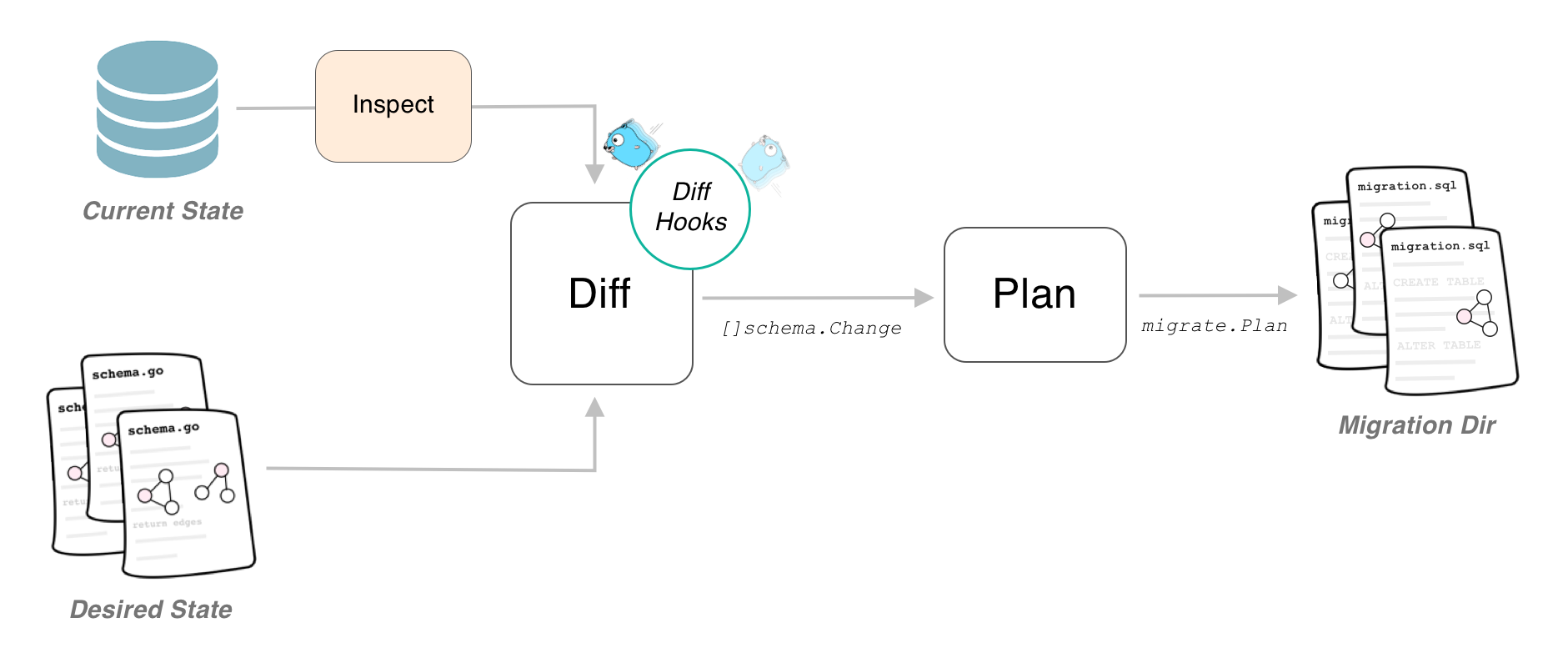
If you are using the Atlas migration engine you are able to use the versioned migrations feature of it. Instead of
|
|
applying the computed changes directly to the database, it will generate a set of migration files containing the
|
|
necessary SQL statements to migrate the database. These files can then be edited to your needs and be applied by any
|
|
tool you like (like golang-migrate, Flyway, liquibase).
|
|
|
|
|
|
|
|
## Generating Versioned Migration Files
|
|
|
|
### From Client
|
|
|
|
If you want to use an instantiated Ent client to create new migration files, you have to enable the versioned
|
|
migrations feature flag in order to have Ent make the necessary changes to the generated code. Depending on how you
|
|
execute the Ent code generator, you have to use one of the two options:
|
|
|
|
1. If you are using the default go generate configuration, simply add the `--feature sql/versioned-migration` to
|
|
the `ent/generate.go` file as follows:
|
|
|
|
```go
|
|
package ent
|
|
|
|
//go:generate go run -mod=mod entgo.io/ent/cmd/ent generate --feature sql/versioned-migration ./schema
|
|
```
|
|
|
|
2. If you are using the code generation package (e.g. if you are using an Ent extension), add the feature flag as
|
|
follows:
|
|
|
|
```go
|
|
//go:build ignore
|
|
|
|
package main
|
|
|
|
import (
|
|
"log"
|
|
|
|
"entgo.io/ent/entc"
|
|
"entgo.io/ent/entc/gen"
|
|
)
|
|
|
|
func main() {
|
|
err := entc.Generate("./schema", &gen.Config{}, entc.FeatureNames("sql/versioned-migration"))
|
|
if err != nil {
|
|
log.Fatalf("running ent codegen: %v", err)
|
|
}
|
|
}
|
|
```
|
|
|
|
After regenerating the project, there will be an extra `Diff` method on the Ent client that you can use to inspect the
|
|
connected database, compare it with the schema definitions and create SQL statements needed to migrate the database to
|
|
the graph.
|
|
|
|
```go
|
|
package main
|
|
|
|
import (
|
|
"context"
|
|
"log"
|
|
|
|
"<project>/ent"
|
|
|
|
"ariga.io/atlas/sql/migrate"
|
|
"entgo.io/ent/dialect/sql/schema"
|
|
_ "github.com/go-sql-driver/mysql"
|
|
)
|
|
|
|
func main() {
|
|
client, err := ent.Open("mysql", "root:pass@tcp(localhost:3306)/test")
|
|
if err != nil {
|
|
log.Fatalf("failed connecting to mysql: %v", err)
|
|
}
|
|
defer client.Close()
|
|
ctx := context.Background()
|
|
// Create a local migration directory.
|
|
dir, err := migrate.NewLocalDir("migrations")
|
|
if err != nil {
|
|
log.Fatalf("failed creating atlas migration directory: %v", err)
|
|
}
|
|
// Write migration diff.
|
|
err = client.Schema.Diff(ctx, schema.WithDir(dir))
|
|
// You can use the following method to give the migration files a name.
|
|
// err = client.Schema.NamedDiff(ctx, "migration_name", schema.WithDir(dir))
|
|
if err != nil {
|
|
log.Fatalf("failed creating schema resources: %v", err)
|
|
}
|
|
}
|
|
```
|
|
|
|
You can then create a new set of migration files by simply calling `go run -mod=mod main.go`.
|
|
|
|
### From Graph
|
|
|
|
You can also generate new migration files without an instantiated Ent client. This can be useful if you want to make the
|
|
migration file creation part of a go generate workflow. Note, that in this case enabling the feature flag is optional.
|
|
|
|
```go
|
|
package main
|
|
|
|
import (
|
|
"context"
|
|
"log"
|
|
|
|
"ariga.io/atlas/sql/migrate"
|
|
"entgo.io/ent/dialect/sql"
|
|
"entgo.io/ent/dialect/sql/schema"
|
|
"entgo.io/ent/entc"
|
|
"entgo.io/ent/entc/gen"
|
|
)
|
|
|
|
func main() {
|
|
// Load the graph.
|
|
graph, err := entc.LoadGraph("/.schema", &gen.Config{})
|
|
if err != nil {
|
|
log.Fatalln(err)
|
|
}
|
|
tbls, err := graph.Tables()
|
|
if err != nil {
|
|
log.Fatalln(err)
|
|
}
|
|
// Create a local migration directory.
|
|
d, err := migrate.NewLocalDir("migrations")
|
|
if err != nil {
|
|
log.Fatalln(err)
|
|
}
|
|
// Open connection to the database.
|
|
dlct, err := sql.Open("mysql", "root:pass@tcp(localhost:3306)/test")
|
|
if err != nil {
|
|
log.Fatalln(err)
|
|
}
|
|
// Inspect it and compare it with the graph.
|
|
m, err := schema.NewMigrate(dlct, schema.WithDir(d))
|
|
if err != nil {
|
|
log.Fatalln(err)
|
|
}
|
|
if err := m.Diff(context.Background(), tbls...); err != nil {
|
|
log.Fatalln(err)
|
|
}
|
|
// You can use the following method to give the migration files a name.
|
|
// if err := m.NamedDiff(context.Background(), "migration_name", tbls...); err != nil {
|
|
// log.Fatalln(err)
|
|
// }
|
|
}
|
|
```
|
|
|
|
## Apply Migrations
|
|
|
|
The Atlas migration engine does not support applying the migration files onto a database yet, therefore to manage and
|
|
execute the generated migration files, you have to rely on an external tool (or execute them by hand). By default, Atlas
|
|
generates one "up" and one "down" migration file for the computed diff. These files are compatible with the popular
|
|
[golang-migrate/migrate](https://github.com/golang-migrate/migrate) package, and you can use that tool to manage the
|
|
migrations in you deployments.
|
|
|
|
```shell
|
|
migrate -source file://migrations -database mysql://root:pass@tcp(localhost:3306)/test up
|
|
```
|
|
|
|
## Moving from Auto-Migration to Versioned Migrations
|
|
|
|
In case you already have an Ent application in production and want to switch over from auto migration to the new
|
|
versioned migration, you need to take some extra steps.
|
|
|
|
1. Create an initial migration file (or several files if you want) reflecting the currently deployed state.
|
|
|
|
To do this make sure your schema definition is in sync with your deployed version. Then spin up an empty database and
|
|
run the diff command once as described above. This will create the statements needed to create the current state of
|
|
your schema graph.
|
|
|
|
2. Configure the tool you use to manage migrations to consider this file as **applied**.
|
|
|
|
In case of `golang-migrate` this can be done by forcing your database version as
|
|
described [here](https://github.com/golang-migrate/migrate/blob/master/GETTING_STARTED.md#forcing-your-database-version).
|
|
|
|
## Use a Custom Formatter
|
|
|
|
Atlas' migration engine comes with great customizability. By the use of a custom `Formatter` you can generate the migration files in a format compatible with another tool for migration management: [pressly/goose](https://github.com/pressly/goose).
|
|
|
|
```go
|
|
package main
|
|
|
|
import (
|
|
"context"
|
|
"log"
|
|
"strings"
|
|
"text/template"
|
|
"time"
|
|
|
|
"ariga.io/atlas/sql/migrate"
|
|
"entgo.io/ent/dialect/sql"
|
|
"entgo.io/ent/dialect/sql/schema"
|
|
"entgo.io/ent/entc"
|
|
"entgo.io/ent/entc/gen"
|
|
)
|
|
|
|
var (
|
|
templateFuncs = template.FuncMap{
|
|
"now": time.Now,
|
|
"sem": ensureSemicolonSuffix,
|
|
"rev": reverse,
|
|
}
|
|
// highlight-start
|
|
// gooseFormatter is an implementation for compatible formatter with goose.
|
|
gooseFormatter, _ = migrate.NewTemplateFormatter(
|
|
template.Must(
|
|
template.New("").
|
|
Funcs(templateFuncs).
|
|
Parse(`{{now.Format "20060102150405"}}_{{.Name}}.sql`),
|
|
),
|
|
template.Must(template.New("").Funcs(templateFuncs).Parse(`-- +goose Up
|
|
-- +goose StatementBegin
|
|
{{ range .Changes }}{{ println (sem .Cmd) }}{{ end -}}
|
|
-- +goose StatementEnd
|
|
|
|
-- +goose Down
|
|
-- +goose StatementBegin
|
|
{{ range rev .Changes }}{{ with .Reverse }}{{ println (sem .) }}{{ end }}{{ end -}}
|
|
-- +goose StatementEnd`)),
|
|
)
|
|
// highlight-end
|
|
)
|
|
|
|
func reverse(changes []*migrate.Change) []*migrate.Change {
|
|
n := len(changes)
|
|
rev := make([]*migrate.Change, n)
|
|
if n%2 == 1 {
|
|
rev[n/2] = changes[n/2]
|
|
}
|
|
for i, j := 0, n-1; i < j; i, j = i+1, j-1 {
|
|
rev[i], rev[j] = changes[j], changes[i]
|
|
}
|
|
return rev
|
|
}
|
|
|
|
func ensureSemicolonSuffix(s string) string {
|
|
if !strings.HasSuffix(s, ";") {
|
|
return s + ";"
|
|
}
|
|
return s
|
|
}
|
|
|
|
func main() {
|
|
// Load the graph.
|
|
graph, err := entc.LoadGraph("/.schema", &gen.Config{})
|
|
if err != nil {
|
|
log.Fatalln(err)
|
|
}
|
|
tbls, err := graph.Tables()
|
|
if err != nil {
|
|
log.Fatalln(err)
|
|
}
|
|
// Create a local migration directory.
|
|
d, err := migrate.NewLocalDir("migrations")
|
|
if err != nil {
|
|
log.Fatalln(err)
|
|
}
|
|
// Open connection to the database.
|
|
dlct, err := sql.Open("mysql", "root:pass@tcp(localhost:3306)/test")
|
|
if err != nil {
|
|
log.Fatalln(err)
|
|
}
|
|
// Inspect it and compare it with the graph.
|
|
// highlight-start
|
|
m, err := schema.NewMigrate(dlct, schema.WithDir(d), schema.WithFormatter(gooseFormatter))
|
|
// highlight-end
|
|
if err != nil {
|
|
log.Fatalln(err)
|
|
}
|
|
if err := m.Diff(context.Background(), tbls...); err != nil {
|
|
log.Fatalln(err)
|
|
}
|
|
}
|
|
```
|