mirror of
https://github.com/ent/ent.git
synced 2026-05-04 08:30:57 +03:00

210 lines
7.2 KiB
Markdown
210 lines
7.2 KiB
Markdown
---
|
|
title: Verifying migration safety
|
|
id: verifying-safety
|
|
---
|
|
## Supporting repository
|
|
|
|
The change described in this section can be found in
|
|
[PR #8](https://github.com/rotemtam/ent-versioned-migrations-demo/pull/8/files)
|
|
in the supporting repository.
|
|
|
|
## Verifying migration safety
|
|
|
|
As the database is a critical component of our application, we want to make sure that when we
|
|
make changes to it, we don't break anything. Ill-planned migrations can cause data loss, application
|
|
downtime and other issues. Atlas provides a mechanism to verify that a migration is safe to run.
|
|
This mechanism is called [migration linting](https://atlasgo.io/versioned/lint) and in this section
|
|
we will show how to use it to verify that our migration is safe to run.
|
|
|
|
## Linting the migration directory
|
|
|
|
To lint our migration directory we can use the `atlas migrate lint` command.
|
|
To demonstrate this, let's see what happens if we decide to change the `Title` field in the `User`
|
|
model from optional to required:
|
|
|
|
```diff
|
|
// Fields of the User.
|
|
func (User) Fields() []ent.Field {
|
|
return []ent.Field{
|
|
field.String("name"),
|
|
field.String("email").
|
|
Unique(),
|
|
-- field.String("title").
|
|
-- Optional(),
|
|
++ field.String("title"),
|
|
}
|
|
}
|
|
|
|
```
|
|
|
|
Let's re-run codegn:
|
|
|
|
```shell
|
|
go generate ./...
|
|
```
|
|
|
|
Next, let's automatically generate a new migration:
|
|
|
|
```shell
|
|
go run -mod=mod ent/migrate/main.go user_title_required```
|
|
```
|
|
|
|
A new migration file was created in the `ent/migrate/migrations` directory:
|
|
|
|
```sql title="ent/migrate/migrations/20221116051710_user_title_required.sql"
|
|
-- modify "users" table
|
|
ALTER TABLE `users` MODIFY COLUMN `title` varchar(255) NOT NULL;
|
|
```
|
|
|
|
Now, let's lint the migration directory:
|
|
|
|
```shell
|
|
atlas migrate lint --dev-url mysql://root:pass@localhost:3306/dev --dir file://ent/migrate/migrations --latest 1
|
|
```
|
|
|
|
Atlas reports that the migration may be unsafe to run:
|
|
|
|
```text
|
|
20221116051710_user_title_required.sql: data dependent changes detected:
|
|
|
|
L2: Modifying nullable column "title" to non-nullable might fail in case it contains NULL values
|
|
```
|
|
|
|
Atlas detected that the migration is unsafe to run and prevented us from running it.
|
|
In this case, Atlas classified this change as a data dependent change. This means that the change
|
|
might fail, depending on the concrete data in the database.
|
|
|
|
Atlas can detect many more types of issues, for a full list, see the [Atlas documentation](https://atlasgo.io/lint/analyzers).
|
|
|
|
## Linting our migration directory in CI
|
|
|
|
In the previous section, we saw how to lint our migration directory locally. In this section,
|
|
we will see how to lint our migration directory in CI. This way, we can make sure that our migration
|
|
history is safe to run before we merge it to the main branch.
|
|
|
|
[GitHub Actions](https://github.com/features/actions) is a popular CI/CD
|
|
product from GitHub. With GitHub Actions, users can easily define workflows
|
|
that are triggered in various lifecycle events related to a Git repository.
|
|
For example, many teams configure GitHub actions to run all unit tests in
|
|
a repository on each change that is committed to a repository.
|
|
|
|
One of the powerful features of GitHub Actions is its extensibility: it is
|
|
very easy to package a piece of functionality as a module (called an "action")
|
|
that can later be reused by many projects.
|
|
|
|
Teams using GitHub that wish to ensure all changes to their database schema are safe
|
|
can use the [`atlas-action`](https://github.com/ariga/atlas-action) GitHub Action.
|
|
|
|
This action is used for [linting migration directories](/versioned/lint)
|
|
using the `atlas migrate lint` command. This command validates and analyzes the contents
|
|
of migration directories and generates insights and diagnostics on the selected changes:
|
|
|
|
* Ensure the migration history can be replayed from any point in time.
|
|
* Protect from unexpected history changes when concurrent migrations are written to the migration directory by
|
|
multiple team members.
|
|
* Detect whether destructive or irreversible changes have been made or whether they are dependent on tables'
|
|
contents and can cause a migration failure.
|
|
|
|
## Usage
|
|
|
|
Add `.github/workflows/atlas-ci.yaml` to your repo with the following contents:
|
|
|
|
```yaml
|
|
name: Atlas CI
|
|
on:
|
|
# Run whenever code is changed in the master branch,
|
|
# change this to your root branch.
|
|
push:
|
|
branches:
|
|
- master
|
|
pull_request:
|
|
paths:
|
|
- 'ent/migrate/migrations/*'
|
|
jobs:
|
|
lint:
|
|
services:
|
|
# Spin up a mysql:8.0.29 container to be used as the dev-database for analysis.
|
|
mysql:
|
|
image: mysql:8.0.29
|
|
env:
|
|
MYSQL_ROOT_PASSWORD: pass
|
|
MYSQL_DATABASE: dev
|
|
ports:
|
|
- "3306:3306"
|
|
options: >-
|
|
--health-cmd "mysqladmin ping -ppass"
|
|
--health-interval 10s
|
|
--health-start-period 10s
|
|
--health-timeout 5s
|
|
--health-retries 10
|
|
runs-on: ubuntu-latest
|
|
steps:
|
|
- uses: actions/checkout@v3.0.1
|
|
with:
|
|
fetch-depth: 0 # Mandatory unless "latest" is set below.
|
|
- uses: ariga/atlas-action@v0
|
|
with:
|
|
dir: ent/migrate/migrations
|
|
dev-url: mysql://root:pass@localhost:3306/dev
|
|
```
|
|
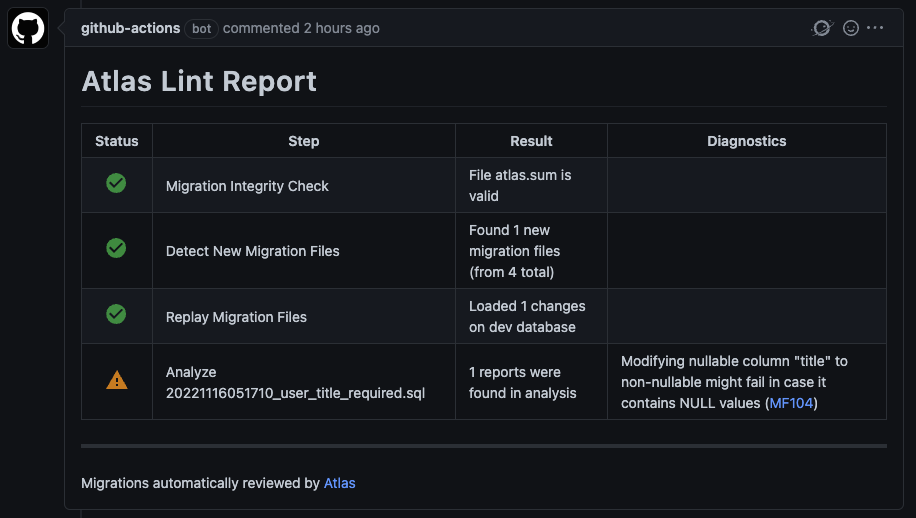
Now, whenever we make a pull request with a potentially unsafe migration, the Atlas
|
|
GitHub action will run and report the linting results. For example, for our data-dependent change:
|
|
|
|
|
|
For more in depth documentation, see the [atlas-action](https://atlasgo.io/integrations/github-actions)
|
|
docs on the Atlas website.
|
|
|
|
Let's fix the issue by back-filling the `title` column. Add the following
|
|
statement to the migration file:
|
|
|
|
```sql title="ent/migrate/migrations/20221116051710_user_title_required.sql"
|
|
-- modify "users" table
|
|
UPDATE `users` SET `title` = "" WHERE `title` IS NULL;
|
|
|
|
ALTER TABLE `users` MODIFY COLUMN `title` varchar(255) NOT NULL;
|
|
```
|
|
|
|
Re-hash the migration directory:
|
|
|
|
```shell
|
|
atlas migrate hash --dir file://ent/migrate/migrations
|
|
```
|
|
|
|
Re-running `atlas migrate lint`, we can see that the migration directory doesn't
|
|
contain any unsafe changes:
|
|
|
|
```text
|
|
atlas migrate lint --dev-url mysql://root:pass@localhost:3306/dev --dir file://ent/migrate/migrations --latest 1
|
|
```
|
|
|
|
Because no issues are found, the command will exit with a zero exit code and no output.
|
|
|
|
When we commit this change to GitHub, the Atlas GitHub action will run and report that
|
|
the issue is resolved:
|
|
|
|

|
|
|
|
## Conclusion
|
|
|
|
In this section, we saw how to use Atlas to verify that our migration is safe to run both
|
|
locally and in CI.
|
|
|
|
This wraps up our tutorial on how to upgrade your Ent project from
|
|
automatic migration to versioned migrations. To recap, we learned how to:
|
|
|
|
* Enable the versioned migrations feature-flag
|
|
* Create a script to automatically plan migrations based on our desired Ent schema
|
|
* Upgrade our production database to use versioned migrations with Atlas
|
|
* Plan custom migrations for our project
|
|
* Verify migrations safely using `atlas migrate lint`
|
|
|
|
:::note For more Ent news and updates:
|
|
|
|
- Subscribe to our [Newsletter](https://www.getrevue.co/profile/ent)
|
|
- Follow us on [Twitter](https://twitter.com/entgo_io)
|
|
- Join us on #ent on the [Gophers Slack](https://entgo.io/docs/slack)
|
|
- Join us on the [Ent Discord Server](https://discord.gg/qZmPgTE6RX)
|
|
|
|
:::
|
|
|